
Search Bar
The search bar, which is visible in all screens, is used for locating specific invoices or declarations within the ONESOURCE DMS 4 Import system.
For each declaration (Simplified or Supplementary, depending on which screen is open), only one entry will be visible in the search bar.
The entry indicates the Local Reference Number (LRN) of the declaration followed by the associated Customs Reference Number provided by Netherlands Customs. You can search for any declaration by its Local Reference Number.
Each entry will also have an associated description to the right. This description indicates the current state of the declaration.
Each search bar has two buttons at the top of the screen, as defined in the table below:
Buttons | Description |
|---|---|
Current | If checked, the search drop-down will list all recent declarations created by the user that are not in an end state. This option is checked by default when the user opens the screen. |
Completed | If checked, the search drop-down will display the declarations with “CLE” or “EXT” statuses. All others will appear under the Current category. |
The example below was taken from the
DMS 4 Import Declaration
screen. Some information was intentionally removed.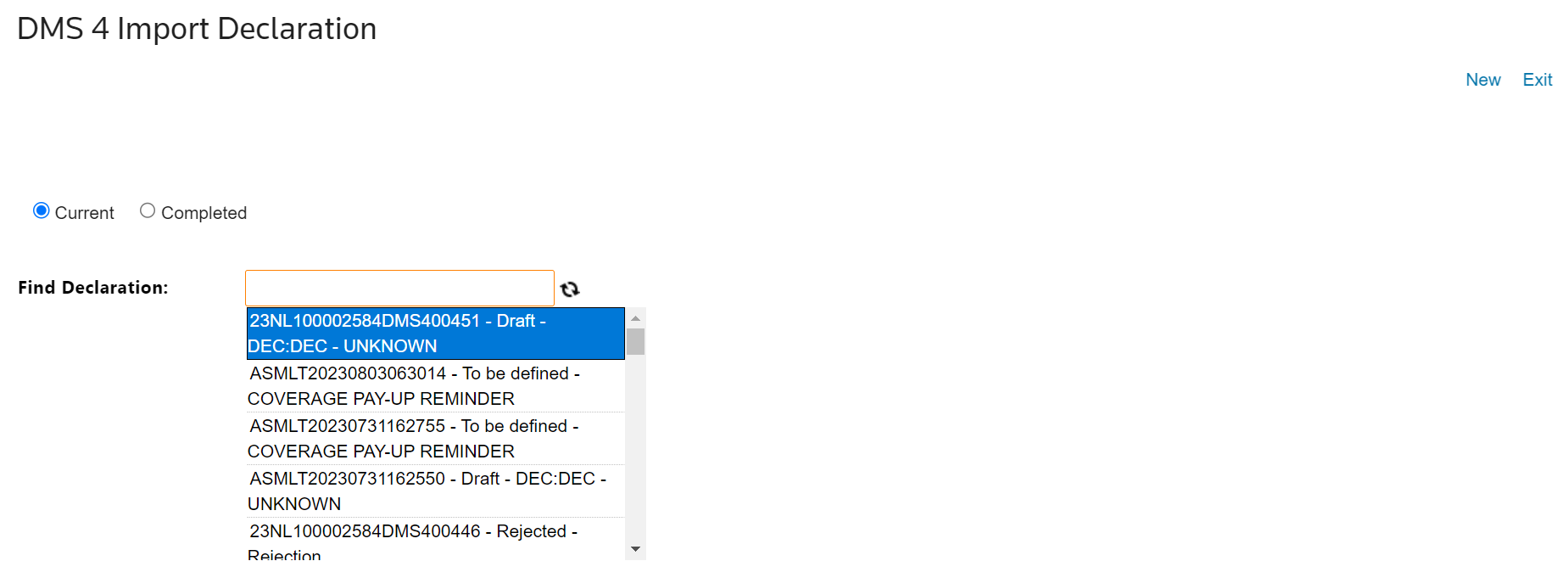
Related Content
-
NL Declaration Management System (DMS) 4 Import
Format: Article