
Communication
The
Communication
tab (located within the Declaration Discrepancy Management
screen) displays all messages, e-mails, and documents that have been sent to a Filer or other party.This tab can be used to:
- Add comments to a declaration
- Review a declaration’s existing documents
- Review e-mail logs
- Send new e-mails
This tab contains three sub-tabs, each of which are explained in the following sections.

Messaging
The
Messaging
sub-tab makes it possible to create messages directly to the users through the ONESOURCE Export Verification application.To create a message:
- Click on the blank text box above the grid.
- Enter a comment.
- After the comment is complete, clickAdd Comment.

The message will then appear in the grid below.

Email Log
The
Declaration Email Log
sub-tab contains a full e-mail history of outgoing messages, complete with:- Message Content
- Message Recipient
- Related Declaration
- Attached Documents
Incoming messages (e.g., messages from the filer) will not be captured in ONESOURCE Export Verification, as those responses are sent directly to your email address. To e-mail an error report, please refer to the
Error Reporting
section of this User Guide for more information.
Sending E-mails
You can send e-mails to a filer directly through ONESOURCE Export Verification.
To e-mail a filer, open the
Communication
tab and select Send Email
. The e-mail process is covered in more detail in the Sending an E-mail
section of this User Guide.
Documents
The
Documents
tab displays all documents stored for the selected declaration.To open a document, choose a document from the grid and then click its corresponding
Extension
link (shown in blue).
To attach documents to a declaration, click
Document Retention
at the top of the screen. This process is covered in more detail in the Document Retention
section of this User Guide.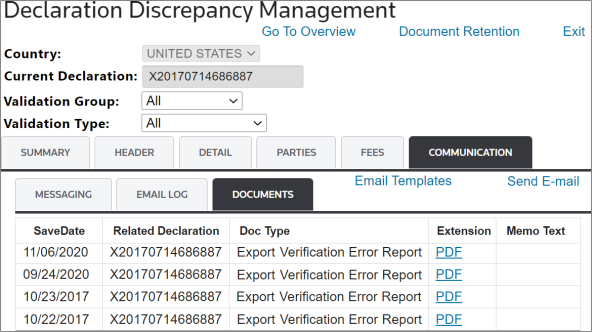
Related Content
-
Declaration Overview
Format: Article