
FTA: Averaging Category Management - Adding A New Category
To add a new category, click
Add New Category
on the top left corner of the grid.
Clicking
Add New Category
will open the Edit Category
pop-up, which you can use to create the new category. The following fields can be used when creating an Averaging Category:- HS
- PlantID
- Product
- Country
- Quarter
- Year
- PeriodStart
- PeriodEnd
- ModelLine
- Class
- Operator
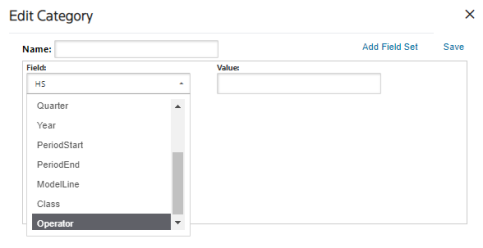
Multiple Field Sets can be used in a single category. Additional Field Sets can be added by selecting the
Add Field Set
button or removed by clicking a field’s corresponding Remove
button.After all field sets have been added, click the
Save
button.The
Edit Category
pop-up will then close and return you to the Averaging Category Management
screen.Related Content
-
FTA: Averaging Category Management
Format: Article