
FTA: BOM Analysis - Certifying a Qualifying BOM
By certifying a BOM, you acknowledge the following:
- The BOM was analyzed within the system.
- The BOM analysis results were reviewed and accepted.
- The BOM is formally certified.
After a BOM is certified, it can be attached to a Certificate of Origin.
To certify a qualifying BOM:
- Choose an accepted analyzed BOM from the grid. Accepted BOMs will show a status ofPassed.

- Review product information for accuracy and, if necessary, edit.
- Once you are sure that the BOM is correct, check the corresponding box on the far left, and clickCertify BOM(s).

- The certified BOM(s) will be displayed in the columns as described below.
 ColumnsDescriptionProduct NumUnique product identifier.Product DescriptionUnique product description associated with each product number.SupplierThe organization that provides a needed product.Certificate Start DateThe effective date of the certificate in the format YYYY-MM-DD.Certificate End DateThe date the certificate expires in the format YYYY-MM-DD.Certificate TypeThe FTA the certificate was created.Preference CriterionThis field identifies the origin criterion used as the basis of the preferential treatment.ProducerThis field identifies the source of the certificate of origin information.Net CostNet Cost identifies the way in which the RVC was calculated.Country of OriginThe country in which the product is produced or manufactured.Accumulation Non Originating ValueAllows the producer or exporter of goods to choose to include as part of the goods' regional value content any regional value added by suppliers of non-originating materials used to produce the final goods.BOM NoteNotes are used for communicating information about a BOM to other users or for capturing details related to the specific product listed on the BOM.
Certifying a Finished Good
If more than one BOM was chosen on the previous screen, a
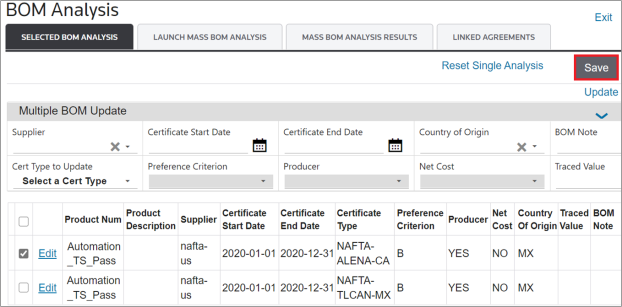
Multiple BOM Update
tool will appear on the screen. This tool is useful for updating multiple BOMs with the same information.To perform a multiple BOM update:
- Complete all fields to be updated.
- After this information has been entered, check the boxes for all BOMs to be updated.
- ClickUpdateto proceed. ClickingUpdatewill mass update all selected BOM records.

To certify the finished good, click
Save
.
Manufacturing Cost Statement (MCS) Report
Alternatively, if a BOM is analyzed for an agreement requiring an MCS, you may use the
Create MCS Reports
link to create an MCS report for that BOM.For more information, see the
Manufacturing Cost Statement
section of this help.
Related Content
-
FTA: BOM Analysis
Format: Article