
FTA Audit Log - Linked Agreements
When an agreement is not updated for the latest version of the WCO tariff, Rules of Origin may be missing for certain HS Numbers of finished goods. The Linked Agreements tab (if configured for your system) can be used to link to past HS Numbers and find the Rule of Origin.
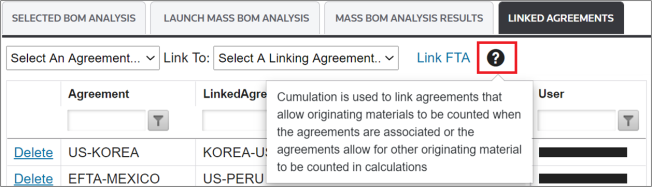
Cumulation (the method by which this tab works) is the ability to identify linked agreements and pull in certificates from other agreements into the qualification process. When an agreement allows for qualifying goods from another agreement to count in the qualification process, the cumulation functionality enables you to link agreements and look for existing certificates to help improve qualification.
Creating a New Linked Agreement
To link two agreements:
- Choose two agreements using the two drop-downs above the grid.
- After these two agreements are selected, click on theLink FTAbutton. The linked agreements will then show as a line item in the grid below.

Additional information is provided when the cursor is hovered over the ToolTip:
Removing a Linked Agreement
To remove a linked agreement:
- Choose a linked agreement in the grid.
- Click its correspondingDeletebutton.A confirmation pop-up will appear on the screen.

- Click “OK” to proceed with the deletion. The linked agreement will no longer appear in the grid.

Related Content
-
FTA Audit Log
Format: Article