
FTA: Product Records - Adding a New Product Record
To add a new product record:
- ClickNew Recordto open theAdd New Product Recordpop-up.

- Enter all necessary information for the fields listed above with the exception ofProduct Description, HSNum, Insert Date, BOM, andDocs. Those fields will populate by pulling data from other areas within ONESOURCE FTA Management.
When adding records for non-material items that contribute to originating content such as
Labor
or Overhead
, only relevant information needs to be completed.important
If
CPTPP
is selected as the agreement and Y
was selected in the TableCIndicator
field on the Products
tab of the Supplier Certificate, a Table C Indicator
drop-down field will appear on the Add New Product Record
pop-up. The information provided will appear in the Agreement
and Accumulation Value
columns of the FTA Product Records
screen.After all data is properly entered, click
Save
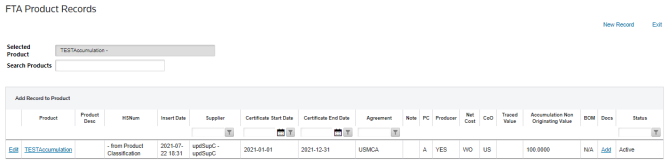
. The record will now display in the FTA Product Records
grid.
Related Content
-
FTA Product Records
Format: Article