
FTA: HS Correlation - HS Collision History
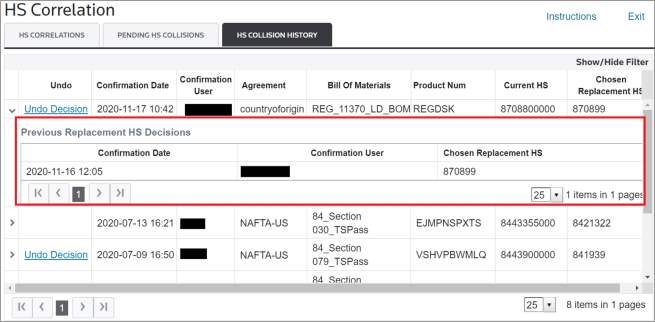
Any previous decisions about correlated HS Numbers to replace current HS Numbers for analysis will appear in the “HS Collision History” tab. Each record in the grid is for a specific BOM and shows the most recently selected replacement HS Number.

Previous Replacement HS Decisions
If a BOM has had multiple replacement HS Number decisions made, then the record can be expanded by clicking on an expansion arrow on the far left of the grid.

After this arrow is clicked, the full history of the previous decisions made for the BOM will be visible on the screen.
Undo Decision
In some cases, you might have selected an incorrect HS Number correlation or a different HS replacement appears that is more desirable. If this happens, the
Undo Decision
button can be clicked for a given BOM.
Clicking
Undo Decision
will re-run the auto-correlation process to find the HS collisions that were previously found and repopulate the Pending HS Collisions
tab with the options. Additionally, a system message will appear on the screen:
If the
Undo Decision
button is not showing for a record, that means that the button was previously clicked and there are already pending collision records waiting for a decision to be made.Instructions
The instructions for the
HS Collision History
tab can be accessed by clicking on the Instructions tab and then viewing the HS Collision History Tab Help
tab.
Related Content
-
FTA: HS Correlation
Format: Article