
FTA: Solicitation Administration - Sending Reminders
Some suppliers may not respond in a timely manner. Should this occur, the
Solicitation Administration
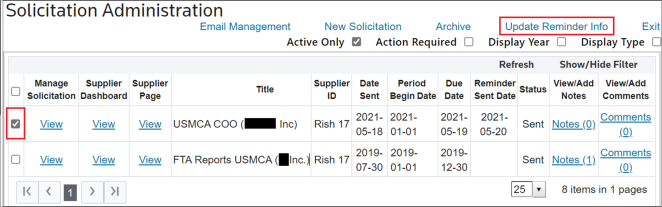
screen can be used to send reminder messages to one or multiple suppliers. To send a reminder to a supplier:
- Choose one or more solicitations from theSolicitation Administrationgrid.
- Check their corresponding boxes on the left.
- After the boxes are checked, clickUpdate Reminder Infoat the top of the screen to open theManage Reminder Informationpop-up, which allows specific reminder instructions to be included in the reminder message.Solicited product lists can also be included on solicitation reminder e-mails.
- Set the date and template to be used for the reminder.
- ClickSend Reminder Now.

All suppliers who received the original solicitation will receive a reminder e-mail, provided their e-mail address is valid. If a listed e-mail address is invalid, the invalid address will be ignored.
You will receive a notification e-mail, notifying you of an invalid e-mail address. Correct the e-mail address and re-send the reminder.
Related Content
-
FTA: Solicitation Administration
Format: Article