
FTA: Supplier Portal Plus (SPP) - Reviewing a Supplier Submitted Certificate
When a supplier submits a certificate, the requestor receives an e-mail notification stating that the requested information/documentation is ready to be reviewed. The subject of this e-mail will be
Response To Solicitation Submitted
.The e-mail will prompt the requestor to log into ONESOURCE FTA Management so the supplier-submitted information/documentation can be reviewed and either accepted or rejected.
Additional information on how to review and accept/reject a supplier submission is provided below.

When the supplier submits a response, the request status changes to
Action Required
on the Solicitation Administration
screen.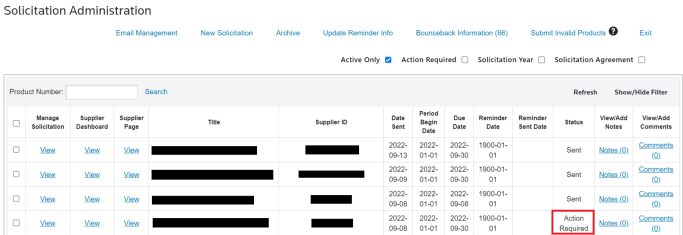
To view a solicitation:
- Open theSolicitation Administrationscreen from theFTAmenu.

- In the grid, choose a recently submitted solicitation response. These are indicated by theAction Requiredstatus.
- In theManage Solicitationcolumn, clickView.

- The system will redirect you to theSolicitation Managementscreen, where the solicitation response information and certificates provided by the supplier can be viewed.
To view the supplier-provided information, open the
Documents
tab. Depending on the information provided, the tab may show the Declaration Letter, Preference Certificate of Origin, or a custom document.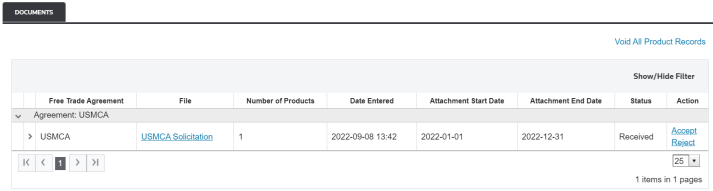
Related Content
-
FTA: Supplier Portal Plus (SPP)
Format: Article