
FTZ Management: ABI Entry Filing - ABI Daily and Monthly Statements
ABI Daily Statements
After a CF7501 is accepted, the preliminary daily statement will be sent to the filer. These daily statements can be viewed on the
ABI Daily Statements
screen under the ABI menu. The statement details are visible and can be printed from this screen.
important
ACH payments should be made from the
ABI Daily Statements
screen.Making a Payment
To make a payment:
- Find the statements on the grid to be paid and check their corresponding boxes.
- Once the boxes are checked, clickPay Selected Statementsat the top of the screen.
 A pop-up will appear with the statement number and amount to pay for confirmation.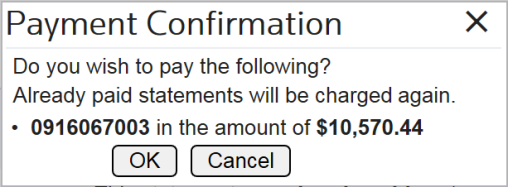
- ClickOkto confirm.
ABI Monthly Statements
For ACE Periodic Monthly Statement (PMS) participants, the monthly overview statements can be reviewed from the
ABI Monthly Statements
screen under the ABI menu. ACH payments should be made using the ABI Daily Statements
screen.
Related Content
-
FTZ Management: ABI Entry Filing and Weekly Entry Overview
Format: Article