
FTZ Management: Reports - CF216 Blanket Application
The
CF216 Blanket Application
screen allows the user to create, modify, and print CF216 Blanket Summary forms for the upcoming zone year. This form is designed to report to CBP each year the type and nature of the activity that will be performed within the Foreign-Trade Zone. These activities may include the following activities for specified goods:- Manipulation
- Manufacturing
- Exhibition
- Destruction
- Temporary Removal
Activity information will be reported at the HTS Code detail level. You also have the option of creating a CF216 form for a joint zone, although this information is not required. Quantity and weight information is optional on the CF216 form. When the screen is initially loaded, information from the most recent CF216 will automatically display.
To create a new CF216 Blanket form:
- Enter the required information.
- ClickAdd Blanket Application. This will create a new CF216 based on the data currently on the screen.
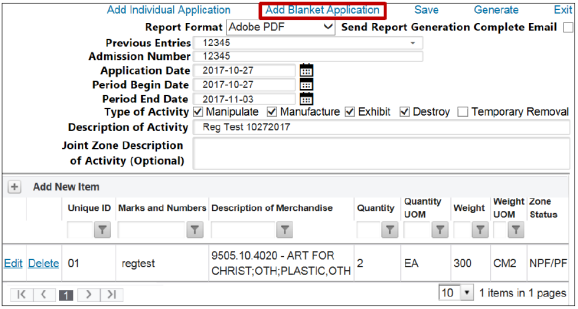
- To add more detail rows, clickAdd New Itemto create another record in addition to the currently displayed rows.

To create the report:
- ClickSave.
- ClickGenerate.
Checking
Send Report Generation Complete Email
sends an e-mail so other tasks can be performed as the CF216 generates. To proceed without a confirmation e-mail, uncheck the box.
 Article