
FTZ Management: Maintenance - Item Master Management
The data displayed in the
Item Master
screen can be maintained in either the in-house ERP system or FTZ Management. Establishing the System of Record (SOR) for data will be defined and completed during implementation.Changing Item Master Data (SOR is ERP System)
If the System of Record is the in-house ERP system, updates to HTS must be applied within the in-house ERP system. Once the updated data is fed into FTZ Management, the updates will reflect within the Item Master.
Changing Item Master Data (SOR is FTZ Management)
In the
Item Master
screen:- Choose a Product Number (ProductNum) to change.Instructions on how to perform a search in a maintenance table screen can be found in theMaintenance Screen Search Criteriasection of this User Guide.
- Once the Product Number is visible in the Item Master grid, clickSelect.

Item Master Tab
- ClickSelectto open the record’sItem Mastertab at the bottom of the screen. TheItem Mastertab contains product-specific information for the selected product number.

- Make any necessary changes, and then clickSaveat the top of the screen.

Item Master HTS Values
The
Item Master HTS Values
tab shows all HTS information that is stored for the selected product number. This information can be used to source receipt and shipment data in FIFO Processing. By default, this tab will appear in a grid view.To view a specific HTS Value:
- Choose a value from the grid below.
- ClickEdit.
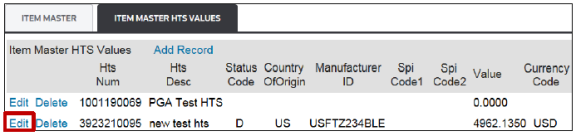
- ClickGrid Viewto return to Grid View.

Additional Tables
The Additional Tables tab holds any additional information about the specified product number. This could include FDA information for the associated product or any other Participating Government Agencies (PGAs) that would be associated with the product.

 Article