
FTZ Management: Tools - Orphan Issue Cleanup
In manufacturing, finished goods are comprised of components. When finished goods are produced, there may be a surplus of leftover components. These components are considered orphans, as they have no parent (finished good) to go into.
The
Orphan Issue Cleanup
screen can be used by manufacturing clients to resolve orphan issues en masse. When resolving issues on this screen; it is very important that the FTZ Administrator understand not only the root cause of the orphan issue, but also what appropriate corrective action needs to be taken.To resolve an orphan issue:
- Review the grid and determine which orphan(s) to resolve.
- Check individual record boxes or use theSelect Allbox in the gray bar.
- Once all orphans to be resolved have been selected, click theActiondrop-down arrow.
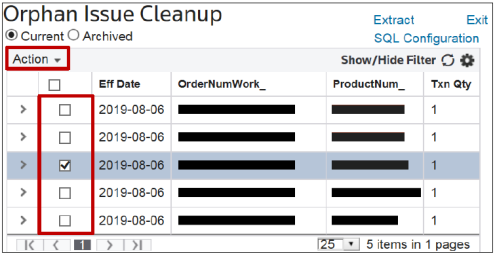
- Select the applicable option depending on whether the orphan issue product remains within the FTZ.

- Create Negative Issue and Negative Adjustment
- This option will create an INPC or INIM transaction as well as an ANPC or ANIM transaction.
- This option usually applies when the orphan issue product is no longer within the FTZ.
- This option usually applies when the orphan issue is not causing an out of balance condition for the applicable ProductNum.
- Once this option is selected, the following confirmation message appears:
Are you sure you want to complete this operation?
Please note that if foreign lawyers are consumed, it may result in duty liability

- Create Negative Issue Only
- This option will create an INPC or INIM transaction, but not an ANPC or ANIM transaction.
- This option usually applies when the orphan issue product remains within the FTZ.
- This option usually applies when the orphan issue is causing (or furthering) a negative out of balance condition for the applicable ProductNum.
- Once this option is selected, the following confirmation message appears:
Are you sure you want to complete this operation?
Please note that no inventory is being relieved from the zone when only negative issues are processed without negative adjustments.
This may create inventory imbalances for these products.

Related Content
-
FTZ Management: Tools Overview, Task Manager, and FTZ Search
Format: Article