
FTZ Management: Maintenance - Set Breakdown
The
Set Breakdown
screen is used to define specific components within a set (i.e. flatware) or the classification breakdown of clock/watches. This screen allows users to create, manage, and monitor sets. This screen can be opened by choosing Set Breakdown
from the Maintenance
menu.The
Set Breakdown
screen has search capabilities consistent with the Maintenance Screen Search Criteria
section of this User Guide. Sets can be categorized as a general set or a clock/watch. If the data is a general set, multiple lines will be reported on the CF7501. Categorizing the set as a clock/watch will submit one line with multiple classifications on the CF7501.The breakout of the FIFO transactions takes place during Staging Data Transfer. Before a Set Breakdown can be created for an item, an Item Master record must exist in the system. The grid at the bottom of the screen shows the detail breakdown of the set.
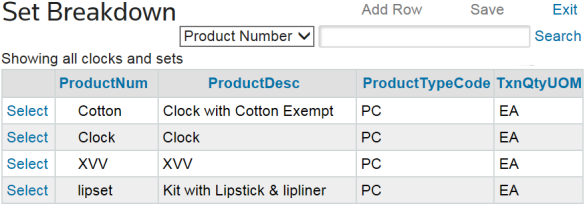
Adding Set Information for a Product Number
- Enter a product number or product description in the search textbox.
- ClickSearchto open a grid with additional information about the product number.

- If there are multiple products available, clickSelectfor the product to be reviewed.
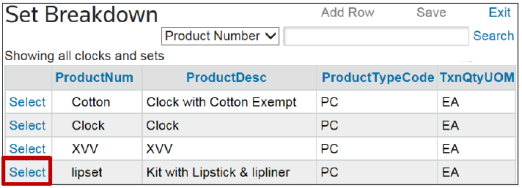
To add set information:
- ClickAdd Rowat the top of the screen.
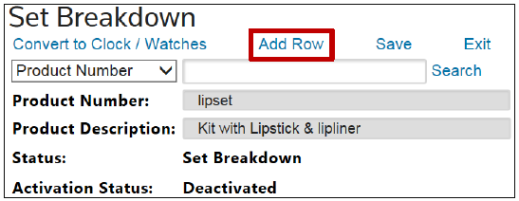
- Scroll down to the grid portion of the screen and select one of the sets.
- Complete the required fields.
- ClickAddat the far left of the row.
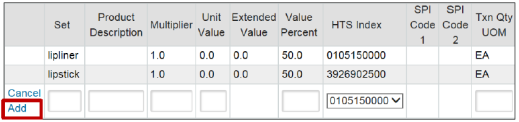
Modifying Existing Set Information for a Product Number
To edit existing set information:
- Choose a row to edit.
- ClickEditon the far left.

- Make any necessary changes to the fields.
- ClickUpdateat the far left of the row.

important
When adding/editing a Clock/Watch identifier, the HTS Number cannot be duplicated for any identifier in the Clock/Watch set.
Deleting Set Information for a Product Number
To delete set information:
- Choose a row to delete.
- ClickDeleteon the left.Identifiers can only be deleted if there is no current inventory for the identifier.

Set Data Elements (Adding/Updating a Set Identifier) | Description |
|---|---|
Set | A unique identifier for the item in the set. Once a set is Activated, Item Master records will be created for each identifier in the set with ProductNum-set as the product number. |
Description | A description of the set identifier. |
Multiplier | The relationship between the identifier and set. In order to have the identifier broken out in the set, the Multiplier must be greater than 0. |
Unit Value | The unit value of the identifier. The user can either manually enter the identifier unit value or calculate the value using the formula: Extended Value * Value Percent |
Extended Value | Calculated using the formula: Multiplier * Unit Value |
Value Percent | The percent of the original value to apply to the unit value. |
HTS Index | The CBP classification of the identifier. |
SPI Code 1 | Special Program Indicator 1 associated with the identifier classification. |
SPI Code 2 | Special Program Indicator 2 associated with the identifier classification. |
Txn Qty UOM | The transaction quantity unit of measure associated with the identifier. |
Currency Code | The currency code of the identifier. |
HTS UOM Conv Factor | The conversion factor associated with the primary HTS Number. |
Addl HTS UOM Conv Factor | The conversion factor associated with the additional HTS Number. |
Weight | The unit weight associated with the identifier. |
RCO21 | An additional information field applied to the FIFO transaction. |
RCO22 | An additional information field applied to the FIFO transaction. |
RCO23 | An additional information field applied to the FIFO transaction. |
Original Value | The value of the entire set. This should be the sum of the Unit Value for each identifier within the set. |
 Article