
FTZ Management: Maintenance - Vendor Manufacturer Lookup (Adding, Modifying)
Some ERP systems can provide the Vendor ID for receipt transactions, but not the Manufacturer ID. The
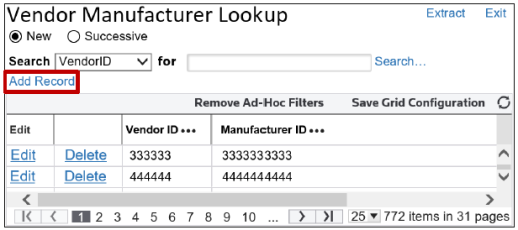
Vendor Manufacturer Lookup
screen allows users to define a relationship between vendors and their corresponding Manufacturer ID. FTZ Management utilizes this table to auto-populate the Manufacturer ID
field on transactions.This screen can be opened by choosing
Vendor Manufacturer
from the Maintenance
menu.The
Vendor Manufacturer Lookup
screen has search capabilities consistent with the Maintenance Screen Search Criteria
section of this User Guide.Adding a New Vendor/Manufacturer
To add a new vendor/manufacturer:
- ClickAdd Record.
- Complete the required fields.
- ClickInsert.

Modifying an Existing Vendor/Manufacturer
To modify an existing vendor/manufacturer:
- ClickEdit.

- Update the required fields
- ClickUpdate.

 Article