
FTZ Management: Preparation - Zone to Zone Transfer and Import Procedures
Zone to Zone Transfer
The
Zone to Zone Transfer
screen is used for transmitting shipment records to a receiving zone. This screen is accessed by choosing Zone to Zone Transfer
from the Preparation
or Reports
menu.Each process zone (
ToZoneID
) has a separate tab from which the user can process zone shipment transactions. To view all process zone shipments for all zones, use the All
tab. The Zone to Zone Transfer
screen will have the All
tab open by default.To select a shipment:
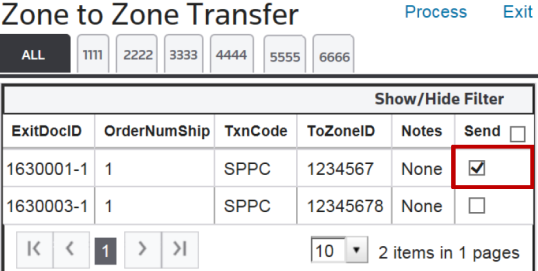
- Check the box on the far right. Multiple boxes can be checked at the same time.
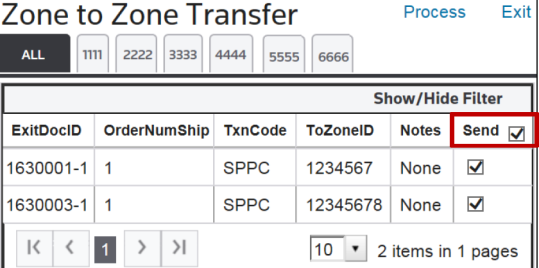
- To select all shipments, check theSendbox at the top of the column.
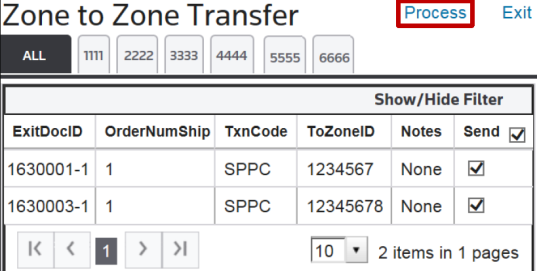
- Once all desired shipments have been checked, clickProcess. ClickingProcesswill generate the zone-to-zone transfer file and send the data to the receiving zone.
Zone to Zone Import
The
Zone to Zone Import
screen is used for importing zone to zone transactions from the shipping zone. This screen can be opened by choosing Zone to Zone Import
from the Preparation
menu.To begin, click
Import files/Retrieve Files
. Wait for the workflow to complete.
 Article