
Classification Assignment Filter
Like many other screens within ONESOURCE Global Classification, the
Classification Assignment
screen has filtering capabilities.To use the filter, click
Show/Hide Filter
.
Clicking
Show/Hide Filter
will make the filter fields for the column headers visible. Choose a column to sort by and enter the value to search for. Once the value is entered, click the filter button to the right.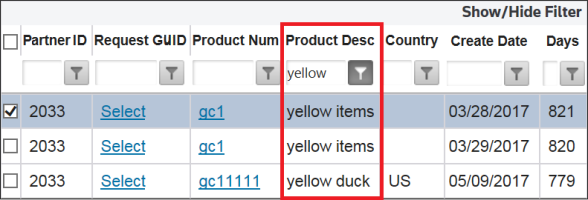
Choose a filter option from the available list. Filter options will vary depending on column type (Alphanumeric, Date, Numeric, etc.).

Once a filter is set, only those items matching the set filter parameters will appear in the grid.
