
Filter and Search Tools
Use the Country dropdown and
Show/Hide Filter
options to narrow down the contents of the grid to the list of products being reviewed.
It is also possible to filter by adding a list of possible Product Numbers to the
Product Number Filter
pop-up. This can be done by clicking on the filter icon on the ProductNum
column.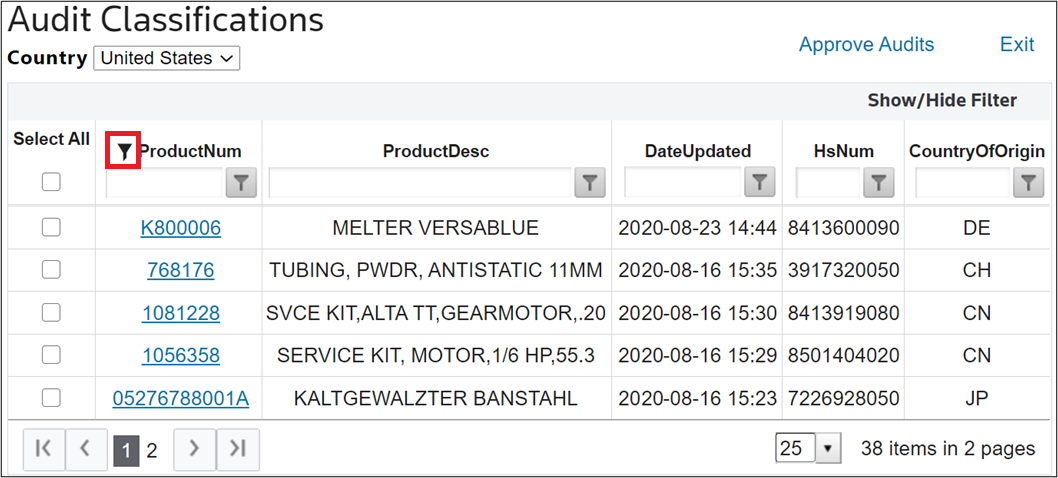
Clicking the Filter icon will open the
Product Number Filter
pop-up. Add a new line for each product number to filter. Once a line is ready to be added, click the "+
" icon.Once the line is added, it will appear in the box below. If a product needs to be removed, click on the product name and then click on the - button. Clicking
Clear All
will remove all products from the list.Once all desired product numbers to be searched are added, click
Search
. The system can support searches of up to 200 product numbers at a time.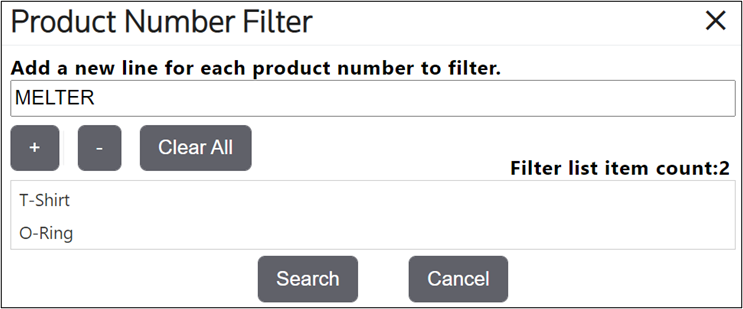
A confirmation message will appear on the screen. Click
OK
to proceed.
After the grid refreshes with the filtered results, all other filtering capabilities (including on the Product Number column) are still available to further filter the grid.