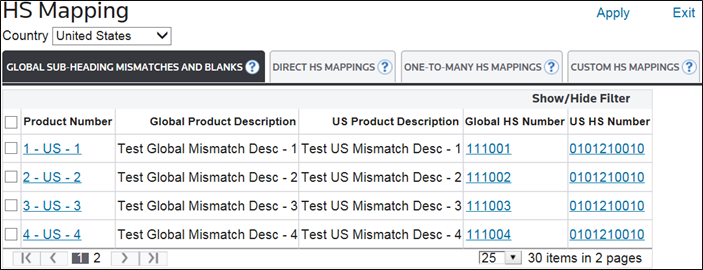
HS Mapping
The
HS Mapping
screen is used to map global 6-digit HS Numbers to country-specific HS Numbers or vice versa. In effect, HS Mapping
allows HS Numbers to be translated from one country to another. This screen can be opened by choosing HS Mapping
from the main Classification menu.important
This screen is only available for client companies who purchased a subscription to ONESOURCE Global Trade Content.
The table below contains information on the four default tabs in
HS Mapping
. Since tabs are configurable, tab names and options may vary. Tabs are set up during implementation.Tabs | Description |
|---|---|
Global Sub-Heading Mismatch & Blanks | This tab maps a country-specific HS Number to the corresponding Global 6-digit HS Number. |
Direct HS Mappings | This tab maps the Global 6-digit HS Number to a corresponding country-specific HS Number. This is a single-possibility feature. |
One-to-Many HS Mappings | This tab maps the Global 6-digit HS Number to a country-specific HS Number. This is a multiple possibility feature and prompts the user to choose one of the suggested country-specific HS Numbers from a list. |
Custom HS Mappings | This tab is used to apply an HS Number to a product that has already been classified in one or more countries. Classification is based on a user-defined cross reference table. |