
Map Navigation
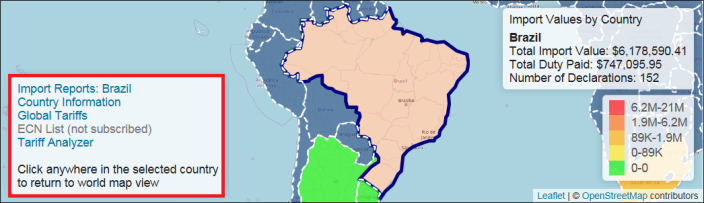
Additional country-specific information is provided in a pair of textboxes which appear on the screen. The first textbox provides Import Values by Country, complete with:
- Total Import Value
- Total Duty Paid
- Number of Declarations
This textbox appears on the upper right of the map when the mouse hovers over a country and will stay on the screen if you click on a country.

The second textbox is configured based on your present subscription to ONESOURCE Global Trade Content. This may include:
- Country Information
- Global Tariffs
- ECN Lists
- Tariff Analyzer
This textbox appears on the bottom left of the map if you click on a country. If you do not have access to a listed Content option, that link will be inactive. To activate a link, please contact your system administrator.
For more information about any of the Global Trade Content functionalities, please reference the ONESOURCE Global Trade Content User Guide(s).
To return to the world map view, click anywhere in the selected country.

Selected country content | Description |
|---|---|
Import Records (Country Selected) | Opens the chosen report as the map target when setting up dashboard configuration. See Creating/Editing Dashboards for more information. |
Country Information | Opens the ONESOURCE Country Information Content pop-up, where various elements of country-specific information are displayed based on level of in-scope Content. |
Global Tariffs | Opens the ONESOURCE Global Tariffs Content pop-up for the selected country. The complete tariff schedule will display. |
ECN List | Opens the ONESOURCE ECN/Dual Use List Content pop-up. The complete ECN regulations list for the selected country will display. |
Tariff Analyzer | Opens the ONESOURCE Tariff Analyzer Content pop-up. The selected country pre-populates into theDestination Country field. |
Related Content
-
GTV Dashboards
Format: Article