
Conditional queries
Catalogs
and Customs Modules
allow you to apply filters to your data so that the results presented can be more satisfactory. To apply a query, select the 3 dots in the column so that the drop-down menu can be displayed. 
Drop-down menu:
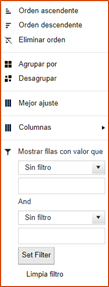
To apply combined filters (more than 1 column), check the
Enable Multiple Filters
option in the grid menu, configure the columns with the conditions that are needed using the drop-down menu, and then click Apply Multiple Filters
from the grid menu.To clean up the applied query, use the Remove Ad-Hoc Filters
option from the grid menu.important
Some options in the Customs module do not display data after opening to avoid performance issues due to the volume of data contained in the tables. In these cases, it is necessary for the user to use and apply the conditional query options so that the data can be displayed in a controlled manner.
Related Content
-
IMMEX - Auditor's version
Format: Article