
Electronic Value Manifest: Document Transmission
tip
To view the image in higher resolution, right-click the image and select
Open image in new tab
.After verifying the document, select the declaration on the filter screen.
Use the drop-down menu next to the
ID
column and select the SEND VALUE MANIFEST
option to transmit it to the authority via interface.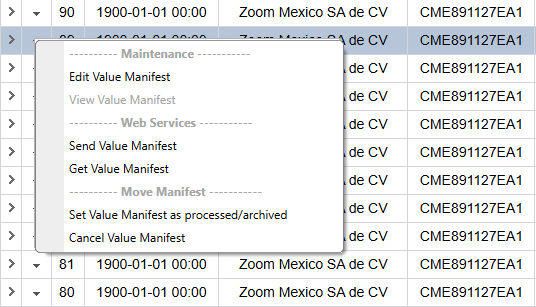
This process may take some time depending on the response speed of the government web service.
After successful transmission of a document, the authority will return a response with the
OPERATION NUMBER
, which is the document number in the authority's system and can be viewed on the filter screen or the customs value declaration screen.If, for any reason, the authority did not issue a response (network issue or service failure), the document status will change to
AUTHORIZATION SENT
. In this case, it is possible to attempt to retrieve the operation number using the GET VALUE MANIFEST
option from the drop-down menu.Once approval is obtained from the authority, the system will store the response
XML file
(ACUSE) with the operation number, the e-document, and the transmitted data string. The response file can be viewed and downloaded by clicking the link associated with the document number directly on the Electronic Value Manifest filter page
.If there are processing errors, these can also be viewed in the
Message
section, after you select Show detail
(arrow pointing right).
important
The Electronic Value Manifest PDF can only be downloaded from the government website, since the E2 model no longer has an official replicable template provided by the authority. Any document issued outside the government system in that regard would be created by similarity and does not meet regulatory compliance requirements.
Related Content
-
IMMEX - Electronic Value Manifest
Format: Article