
COVE – Unique Invoice
COVE is the electronic value receipt validated by a system that previously receives the information of very important documents. These documents include the value of the merchandise as well as (in the case of consolidated remesas) crossing papers.
Crossing Papers
consist of pro forma invoices, packing lists, and any of the following documents listed below which prove the value of the merchandise:- Fiscal Invoices
- Import Invoices
- Remission Notes
- Value Declarations
These documents are homologated in an XML e-file. This e-file eliminates the need for a physical document.
To generate a unique invoice.
- Choose an invoice from theWork With Invoicesgrid and hover the cursor over the downward facing arrow in the second leftmost column.

- A menu will appear. SelectRepresentative for COVEto open theRepresentative for COVEpop-up, which contains all available representative options.

- Click on the drop-down, select a representative, and then clickSave.
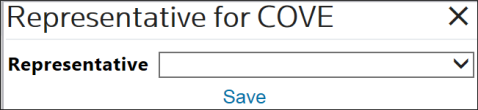
The system will then update the value of the
COVE Representative
field. The next step in this process is to send COVE.- The products will be displayed in the same sequence as they were added and arranged on theIn order to perform this task, return to the same invoice you selected earlier and chooseSend COVEfrom the menu. The system will then generate the XML that will be sent to Unique Window.Edit Invoicescreen.
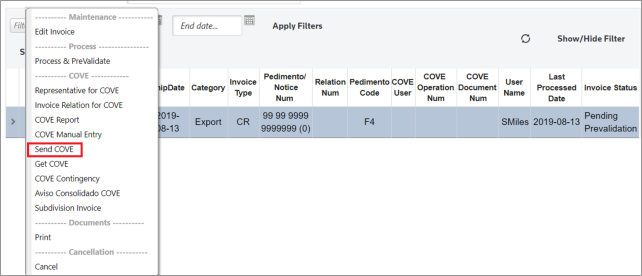
- After the COVE data has been successfully transmitted, the system will change the invoice status toCOVE Transmitted – Results Pending.

- Wait approximately 20 seconds.
- Re-select the same invoice and chooseGet COVEfrom the menu.

The system will then receive an answer from VUCEM COVE. If the VUCEM COVE answer was successful, the invoice’s status will change to
Pending Close
.
If the VUCEM COVE answer was unsuccessful; the
Invoice Status
will be Rejected by COVE
.
It is also possible to execute the COVE Manual, COVE Contingency, and Import COVE Response Files. See the
Alternate COVE Process
section of this User Guide for more details.
Related Content
-
IMMEX
Format: Article