
Value Manifest (Electronic)
This feature represents the new layout for the
Value Manifest
that must be presented electronically (through web service) to Authorities previously to the import and must contain all values applied to the imported itemsBesides of the interface to transmit the document, this new Value Manifest feature also keeps the documents issued and allows you to view the documents generated and transmitted.

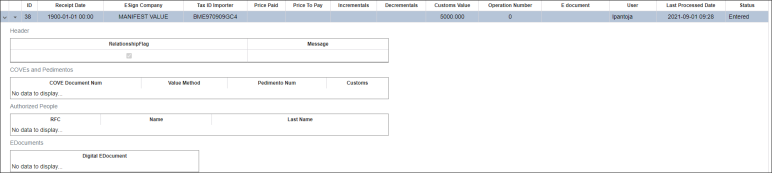
By expanding button you can see different fields related to the document, that were introduced on Value Manifest screen:
- Header
- COVEs and Pedimentos
- Authorized People
- EDocuments
Hovering the cursor over the down arrow button, you can see different options classified in the Menu, by:
- Maintenance – Edit Value Manifest
- Webservice – Send Value Manifest and Get Value Manifest
- Move Manifest – Set Value Manifest as processed/archived and Cancel Value Manifest

A new option was added in the dropdown menu named
View Value Manifest
which opens documents whose status are SEND and AUTHORIZED only, allowing you to see the details for the Value Manifest.
This section below displays three different tabs:
- COVE: Displaying COVE Document Number and Value Method
- Authorized People: Displaying RFC number, Name and Last Name
- EDocument: Displaying Digital EDocument number

Related Content
-
IMMEX
Format: Article