
ABI: Add/Update Manufacturer - Adding a Manufacturer and Updating ZIP/Postal Code
To add a new Manufacturer.
- ClickAdd New.

- Enter the following manufacturer information.
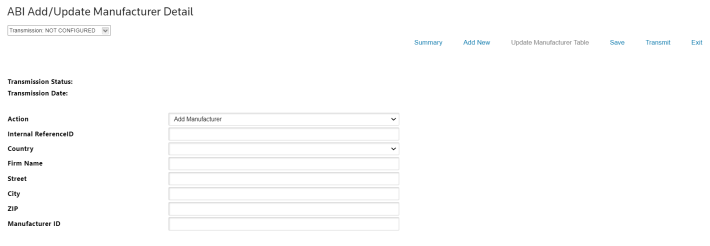 FieldsDescriptionActionUse the dropdown to selectAdd Manufacturer.Internal Reference IDInsert your identifier reference.CountryUse the dropdow to select a country.Firm NameEnter the name of the manufacturer.StreetEnter the street address of the manufacturer.CityEnter the city of the manufacturer.ZIPEnter the ZIP/postal code of the manufacturer.importantIn case the manufacturer country is China, it is required to provide a valid 6-numeric zip/postal code.Manufacturer IDEnter the manufacturer identifier code.
 - ClickTransmitto send the new manufacturer file to CBP. The page will take you back to the summary and the following validation message will be displayed.

UPDATE ZIP/POSTAL CODE
You can update a manufacturer ZIP/postal code to an existing MID code with CBP by following the instructions described below.
- Find the manufacturer you want to update and clickDetailon the right side of the screen.
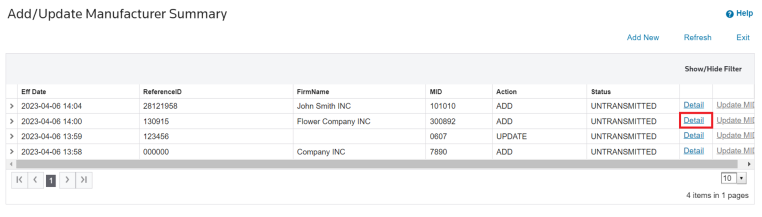
- You will be taken to theABI Add/Update Manufacturer Detailscreen and can perform your update. Change theActiontoUpdate.
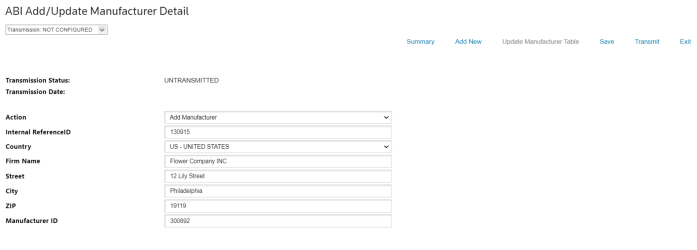
- Update the ZIP code.
- Click Save to confirm your changes. You can clickSummaryto go back to theAdd/Update Manufacturer Summaryscreen.
important
You can also update the ZIP/postal code to an existing MID by selecting the “Update ZIP/Postal Code” on the “Action” dropdown, but you will have to insert the required data of the corresponding manufacturer to perform your update.
Related Content
-
Automated Broker Interface (ABI)
Format: Article