
ABI: Entry Summary (Entry 7501) - Bill of Lading
The
Bill of Lading
tab displays additional data regarding the specified Bill of Lading.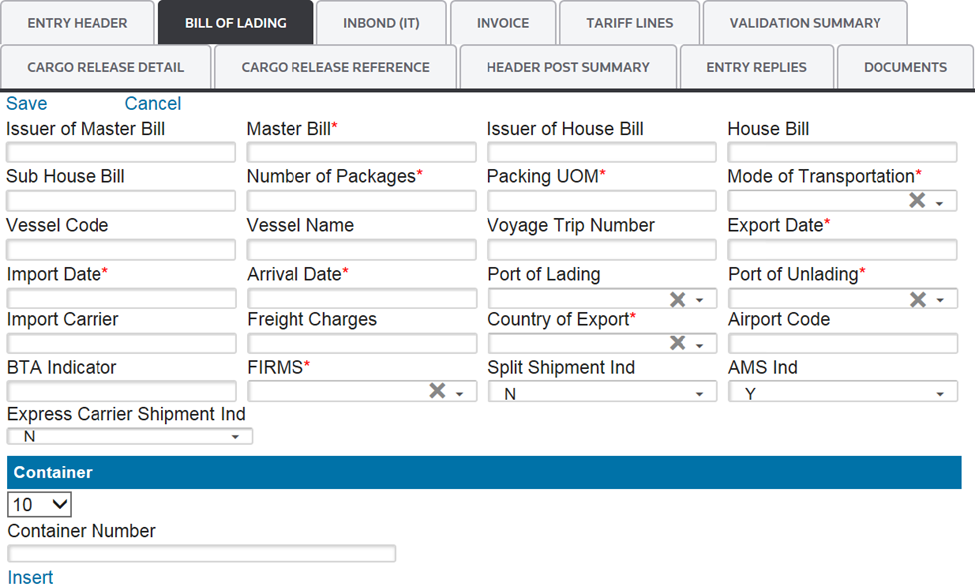
Several links are located at the top left corner of the
Bill of Lading
tab. Some of these may not appear, depending on user permission levels.Links | Description |
|---|---|
Save | Saves any data added or changed since the screen was last saved in Edit mode. |
Cancel | Discards any changes to the screen since the last save. Returns screen to Read Only mode. |
Edit | Changes screen to Edit mode so additions/changes can be made. |
Add New | Adds a new Bill of Lading to the entry. |
Delete | Deletes the selected Bill of Lading. |
In order to complete this section, the useryou must fill out the information in the fields below. Required fields will be marked by an asterisk (*) on the screen:
Bill of Lading (Data Entry Fields) | Description |
|---|---|
Issuer of Master Bill | Reference to a Transportation Master Waybill, Ocean Bill of Lading, Pro-Bill, Rail Bill, or Air Waybill. This must be a known, four-character SCAC. Note: The Issuer may or may not be the operating conveyance carrier. |
Master Bill | The remaining characters in the Master Bill of Lading. |
Issuer of House Bill | Reference to a Transportation House Waybill, Ocean Bill of Lading, Pro-Bill, Rail Bill, or Air Waybill. This is always required when the House Bill Number is reported for a vessel and should be a known, four-character SCAC. |
House Bill | The remaining characters in the House Bill of Lading. |
Sub House Bill | The lowest-level bill number. This field is not used at this current time, but is intended for future use. |
Number of Packages | Manifest Quantity (Exterior Packaging Level) |
Packing UOM | Manifest Quantity Unit of Measure |
Mode of Transportation | One of the following two-digit codes must be entered for Mode of Transportation:
|
Vessel Code | The Lloyd’s code identifier of the importing vessel. Not required/not reported. |
Vessel Name |
|
Voyage Trip Number | The carrier’s identification of the trip/manifest. |
Export Date | The date that the exporting vessel departed the last port in the exporting country. |
Import Date |
|
Arrival Date | The date the merchandise arrived (or is expected to arrive) at the District/Port of Entry. |
Port of Lading | The code for the foreign port where the merchandise was laden onto the importing vessel. For more information, see “Schedule K: Classification of Foreign Ports by Geographic Trade Area and Country.” The port must be listed in the “Port of Unlading” Maintenance table. |
Port of Unlading | The code for the US port where the merchandise was unladen from the importing conveyance. The port must be listed in the “Port of Unlading” Maintenance table. |
Import Carrier | The identification of the entity responsible for transporting the merchandise from the foreign Port of Lading to the first US Port of Unlading.
|
Consignee | The US party or other entity (individual or firm) on whose account the merchandise is shipped. |
Freight Charges | The aggregate cost (excluding duty) of freight, insurance, and other costs incurred, reported in whole US dollars (USD). Note: If this field is used, the freight will be prorated by weight for all HTS items associated with the Bill of Lading. |
Country of Export | The country from which the article was shipped to the US having last been a part of the commerce of that country. Use the two-character ISO Country Code. The country must be listed in the “Country” maintenance table. |
Airport Code |
|
BTA FDA Ind | This field is used to determine if the cargo is subject to the Bioterrorism Act. The default is “ N ” (No), but “Y ” (yes) can be selected as applicable. |
FIRMS | A Facilities Information and Resources Management Systems (FIRMS) code representing the location of the goods. |
Split Shipment Ind | Used to indicate that the ACE Cargo Release (SE) is associated with a split shipment, which is a factor in adjudicating the Cancellation Request. |
AMS Ind | The default value for this field is “ Y ”. If the Bill of Lading will not be manifested via EDI with a CBP automated manifest system, change to “N ”. See below for a list of specific instances where “N ” should be selected:
|
Express Carrier Shipment Ind | Used to indicate an Express Carrier Tracking Number (air only) is being reported. |
Bill of Lading: Container
After saving the form portion of the
Bill of Lading
tab, you will then proceed to the Container
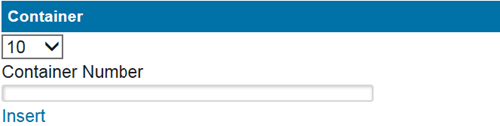
section of the screen. This section is located below the form and is not required. You may use this section to attach a container/equipment number associated to a Bill of Lading.To add a container/equipment number, the container/equipment number in the
Container Number
field and click Insert
. After the data has been entered in the two fields below, click Save
.After
Save
is clicked or if the Container section is not applicable for the entry, proceed to the next tab. If the Port of Arrival and Port of Entry are different, go to Inbond (IT)
.If the Port of Arrival and Port of Entry are the same, go to
Invoice
.
Related Content
-
Automated Broker Interface (ABI)
Format: Article