
Manufacturer ID
The
Manufacturer ID
screen is used for maintaining and updating Manufacturer information. This screen displays all the Manufacturer IDs (MIDs) utilized by the subzone and allows the user to add, modify, or delete MIDs as needed. This screen can be opened by choosing Manufacturer ID
from the Maintenance
menu.Information that is provided for update includes name, address, and an indicator for whether or not the manufacturer has a relationship with the subzone. This data is used for Customs reporting purposes.
To perform a search for a specific Manufacturer ID, choose a column header to search in the
Search
drop-down, and then set the date parameters. Click Search
….Searches can either be new or successive.

Adding a New Manufacturer ID
To add a Manufacturer ID (MID) to the system, click
Add Record
.
Enter the new manufacturer data, then click Insert.

Modifying an Existing Manufacturer ID
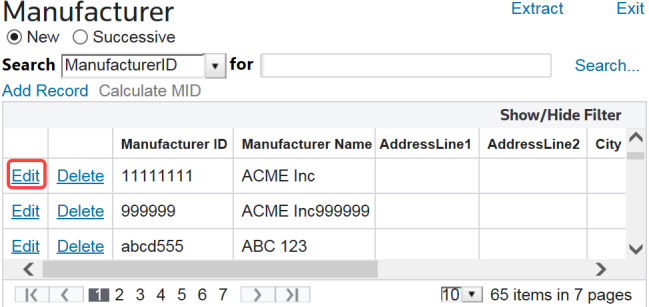
To modify an existing Manufacturer ID (MID), locate the MID in the
ManufacturerID
column, then click Edit
.
Make any necessary changes, then click
Update
.
Deleting an Existing Manufacturer ID
To delete a manufacturer, choose a manufacturer from the grid and click
Delete
on the left.
Related Content
-
Maintenance
Format: Article