
Transaction Correction
*This section is provided for long-term support and visibility purposes only. No user action is required. *
The
Transaction Correction
screen is used for correcting transaction errors and warnings identified in the Validation Status
step listed above. This screen can be opened by choosing Transaction Correction
from the Drawback
menu.
Definitions: Errors vs. Warnings | Description |
|---|---|
Error | A hard stop in Drawback Processing. This data is invalid or missing and must be resolved before the user can move beyond the validation step. |
Warning | A potential issue with complete data. This data may also invalid, but the system will move beyond the validation step. |
Use the
Filter field
drop-down to choose a filter option, then use the “Filter value” drop-down to choose an error type. Error results and warning results will be separated into separate tabs.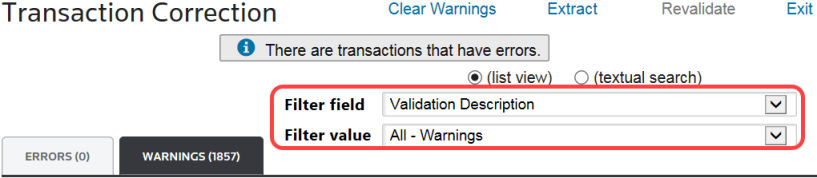
To correct an error or warning identified by the previous
Validation Status
process, choose an error/warning from the grid and click Edit. Make all necessary changes and save.
After all errors in the
Transaction Correction
screen have been resolved, click “Revalidate” at the top of the screen. This will redirect you to the Validation Status
screen. Run the validation workflow again. Repeat this process until all errors have been resolved.
Related Content
-
Drawback Processing
Format: Article