
7501-09 Reconciliation
In instances where the values reported on a 214 FTZ Admission have changed since the filing of the 7501-06 Entry Summary, the
7501-09 Reconciliation
screen can be used to reconcile these filings with US Customs. This screen can be opened by choosing 7501-09 Reconciliation
from the Forms
menu.
7501-09 Reconciliation Process
Reconciliation is a three-step process, as defined below.
First, review the list of 7501-06 Entry Summary filings that are to be reconciled. This is done by changing the
Summary Date Ending
field to include all 7501-06 Entry Summary forms to be reconciled and selecting Unreconciled 7501 Listing
as the Report Type
using the buttons at the top of the screen.Click
Generate
to create a report showing all 7501-06 Entry Summary forms with a summary date since the last reconciliation up to the date in the Summary Date Ending
field.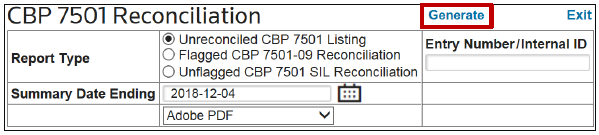
A hyperlink to the report will appear at the top of the screen. Click this link to open and review the report, confirming the correct entries are listed and that all final values have been entered and are not $0. Any entries marked with a Type of
SIL
must be manually reconciled and will not be included in the 7501-09 Reconciliation entry documentation.
Second, update the entry list and enter any missing final values. When the
Summary Date Ending
is updated, the Unreconciled Entries
section of the screen will populate with the entries included in this date range.If any of the displayed entries have an incorrect Summary Date or should not appear on the reconciliation because they were not actually flagged for reconciliation, click
Edit
on the left to update the Summary Date
and/or the Flagged
field to indicate if the entry should be flagged for reconciliation.
The
Related Admissions
section defaults to display all admissions related to the first entry listed in the Unreconciled Entries
grid.To see the admission detail of a different entry, choose an entry number from the
Unreconciled Entries
grid and click Show Detail
on the far left.
After the correct entry has been specified, review the contents of the
Related Admissions
section. To resolve an issue, click Edit
on the left.
So long as the selected receipt was not included on an entry that has already been reconciled, the
Final Value
field will become editable. If the admission has been reconciled on another entry, the value can no longer be edited.Editing the
Final Value
on the 7501-09 Reconciliation
screen also updates the Final Value
field on the 214 FTZ Admission
screen for the appropriate admission. Make any necessary changes to the Final Value
, and then click Update
.
Third, generate the 7501-09 Reconciliation reports and data file. After all the data is validated as correct and ready for reconciliation, go to the top of the screen and choose
Flagged 7501-09 Reconciliation
as the Report Type. Click Generate
to create the report.
After the reports are generated, hyperlinks will appear at the top of the screen.
To view a report(s), click the link(s). A separate browser tab will open for each report. Review the contents of the report(s), and then click
Finalize
.Clicking
Finalize
will assign the displayed Entry Number/Internal ID to the 7501-09 Reconciliation entry and produce the electronic file to be imported into an ABI package for production of the reconciling party.The format of the ABI file and the method of communicating the file to the ABI software are configurable.

If the entries contain goods that must be reconciled using the
SIL
process, a report containing necessary information for the SIL can be produced.To begin this process, choose
Unflagged CBP 7501 SIL Reconciliation
as the report type and click Generate
. The resulting report can be used as supporting detail for the SIL produced by you.
Selecting this report type populates the
Unreconciled Entries
and Related Admissions
sections with the SIL un-flagged entries. Updates to the data can be made in the same fashion as entries flagged for reconciliation.Upon verifying this report, click
Finalize
to assign the displayed Entry Number
to the SIL.Command Buttons
The
CBP 7501 Reconciliation
screen contains the following command buttons at the top of the screen:Command Buttons | Description |
|---|---|
Generate | Clicking this link will generate the type of report specified in the Report Type field. This will also create an ABI Entry File for the 7501-09 Reconciliation Entry. After the report(s) are produced, you can click the newly generated report link(s) to view the report(s) in a separate browser tab.After the 7501-09 Reconciliation is finalized (by clicking Finalize ), the 7501-09 Reconciliation cannot be reprinted. |
Exit | Clicking this link will cause the screen to close without saving the newly entered data. |

Data Entry Fields
The
CBP 7501 Reconciliation
screen contains the following data entry fields:Fields | Description |
|---|---|
Report Type | Please refer to the Reconciliation: Process section for descriptions of the usage of the Report Type buttons. |
Entry Number/ Internal ID | The number to be assigned to the reconciling entry. This entry number will automatically be skipped when the next 3461 Weekly Estimate is generated. This field appears in the header of the Reconciliation Detail report as the Reconciliation Entry Number. |
Summary Date Ending | The cutoff date used to determine which entries appear in the Unreconciled Entries section of the 7501-09 Reconciliation screen and the generated reports.If an entry has not been reconciled and the entry summary date is prior to the date entered in the Summary Date Ending field, it will appear on the screen and the reports.To update the screen display, update the Summary Date Ending value, then tab off the field. The screen will automatically refresh and defaults to a date six months prior to the current date. |
Report Format | The selected format in which the 7501-09 Reconciliation reports, the Continuation Page, and the Pro Forma will be produced. Available formats include Adobe PDF (default), Excel spreadsheet, and Word document. |
Type | Indicator of whether or not the entry can be reconciled on a 7501-09 Reconciliation (Type 09 ) or if a SIL must be used (Type SIL ).The Type of each admission attributed to an entry appears on the Unreconciled Entry Listing report. |
(Unreconciled Entries) Entry Number | The number of the Unreconciled Entry whose summary date is prior to the given Summary Entry Date value. This is a list of the entries that will be marked as reconciled upon clicking Finalize . This field appears on the header of each entry being reconciled on the Unreconciled Entry Listing and Reconciliation Detail reports. |
Entry Date | The first date of the weekly entry covered by the given 7501 form. This field appears on the Reconciliation Detail report, in the header for each entry being reconciled for the entry period. |
Summary Date | The date on which the 7501-06 Entry Summary was submitted to CBP for approval. This field appears on the Unreconciled Entry Listing report and on the Reconciliation Detail report in the header for each entry being reconciled. |
Flagged | A Yes/No indicator of whether or not the given 7501 was flagged for reconciliation. |
Status | The zone status of the given entry. This field appears on the Reconciliation Detail report, displayed on each HTS line item detail of that entry. |
Original Value | The total value of all products appearing on the original filing of the Entry Summary .This field appears on the Reconciliation Detail Report, displayed on each HTS line item detail of that entry. |
Reconcile Value | The total value of all products included on the given Entry Summary as calculated by referencing the Final Value of all 214 FTZ Admissions attributed to the shipment(s) appearing on the 7501. This field appears on the Reconciliation Detail report, displayed on each HTS line item detail of that entry. |
Value Change | The calculated difference between the Original Value and the Reconcile Value .This field appears on the Reconciliation Detail report, displayed on each HTS line item detail of that entry in the Entered Value Difference column. |
Original MPF | The total Merchandise Processing Fee (MPF) appearing on the original filing of the Entry Summary. This field appears on the Reconciliation Detail report, displayed in total for each reconciled entry. |
Reconcile MPF | The total Merchandise Processing Fee (MPF) as calculated by referencing the Final Value of all 214 FTZ Admissions that were attributed to the shipment(s) appearing on the 7501. This field appears on the Reconciliation Detail report, displayed in total for each reconciled entry. |
MPF Change | The calculated difference between the Original MPF and the Reconcile MPF . This field appears on the Reconciliation Detail report, displayed in total for each reconciled entry in the MPF Value Difference column. |
(Related Admissions) Entry Number | The entry number selected above for which admission detail is being displayed. The Related Admissions section displays all 214s that were attributed to the indicated entry number. |
Admission Number | The 214 FTZ Admission number attributed to the selected entry. This field appears on the Unreconciled Entry Listing report with each admission listed under the appropriate entry number. |
Country | The Country of Origin of the product on the given 214 FTZ Admission.This field appears on the Unreconciled Entry Listing report with each admission listed under the appropriate entry number. It also appears on the Reconciliation Detail report, displayed on each HTS line item detail of that entry. |
Final Value | The final value of the given admission. This field appears on the Unreconciled Entry Listing report, with each admission listed under the appropriate entry number. |
Invisible Fields (Populate Unreconciled Entry Listing Report)
The following fields do not appear on the
CBP 7501
screen but populate on the Unreconciled Entry Listing Report.Fields | Description |
|---|---|
Entry End Date | The last date of the weekly entry covered by the given 7501 document. This is determined from the given entry. |
Importer Number | The IRS, Customs, or Social Security Number of the ultimate consignee as defined in Part 142.3(a)(6) of the Customs Regulations. Only the following formats shall be used: • IRS Number (NN-NNNNNNN)
This field is populated using a value obtained from the EIN field of the Defaults Maintenance table. |
Invisible Fields (Populate Reconciliation Detail Report)
The following fields do not appear on the
CBP 7501
screen but populate on the Reconciliation Detail Report.Fields | Description |
|---|---|
Reconciliation Summary Date | The date the 7501-09 Reconciliation Entry Summary was generated. |
Reconciliation Type | The appropriate two-digit numeric code for the type of entry being filed. This field is defaulted to 09 , which represents a Reconciliation entry. |
Port of Entry | The four-digit numeric code of the port where the Entry Summary is being filed (e.g. Miami, FL = 5201; Los Angeles, CA = 2704). Port Codes are found in Annex A of the TSUSA and are included in Appendix B of this Help Center. The application populates the Port Code using the FTZ Port in the Defaults Maintenance table. |
Line | The entry line number, in sequence, beginning with the number 001. A “line number” refers to a commodity from one country, covered by a line which includes a Net Quantity, Entered Value, HTS Number, Charges, Rate of Duty, and Tax. However, some line numbers may actually include more than one HTS Number and value. |
HTS Number | The appropriate duty/statistical reporting number under which the article is classified in the Tariff Schedules of the United States Annotated or the Harmonized System Tariff. This is the HTS Number appearing on the referenced Line of the original entry. |
Manufacturer ID | The Manufacturer ID (MID) appearing on the referenced Line of the original entry. |
Related Content
-
Forms
Format: Article