
Export Management
Within the ONESOURCE Export Management solution, the
Export Invoice Management
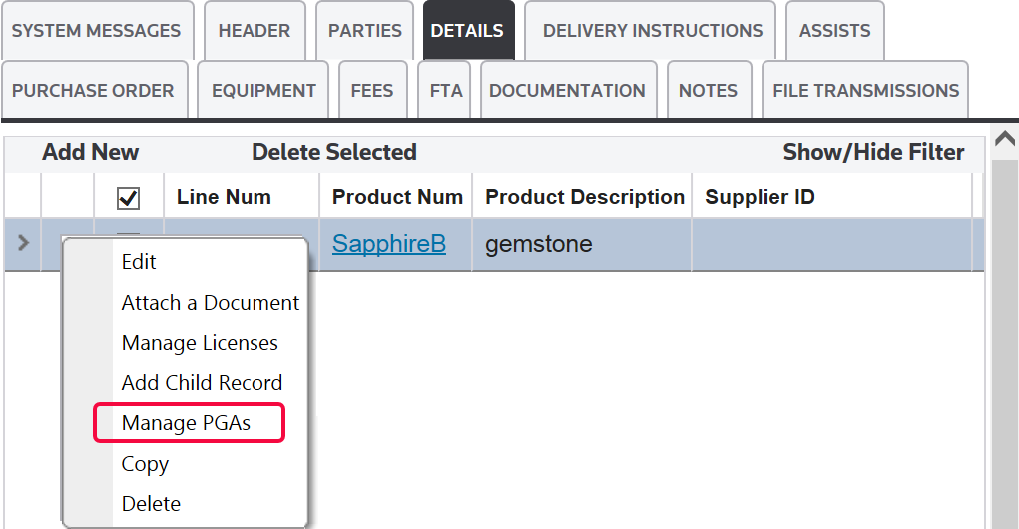
screen can be used to view and store specific shipment information. PGA data can be stored at an invoice line level in this solution. If the system was configured to utilize Partner Government Agency (PGA) data tables, the Manage PGAs
option will be visible in the Details
tab. Each PGA has a separate tab.To manage PGA records:
- Choose a detail line item.
- Move the cursor over the downward pointing arrow to the left of theLine Numcolumn.
- ClickManage PGAs.
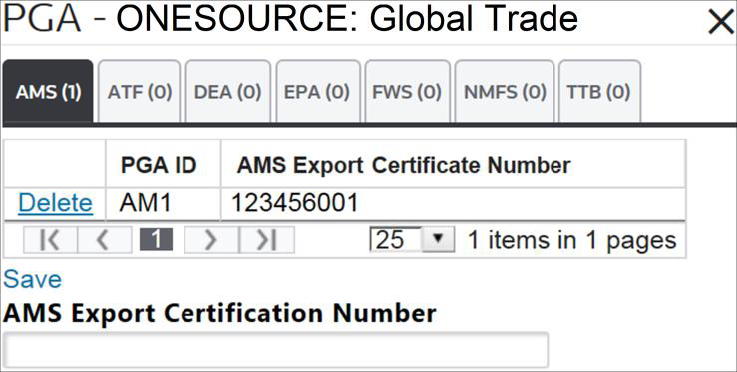
- Click the needed PGA tab.
- Enter information into the appropriate fields below.
- ClickSaveto save changes. The system can be configured to inform you if PGA data is required. For additional details, please contact your system administrator.
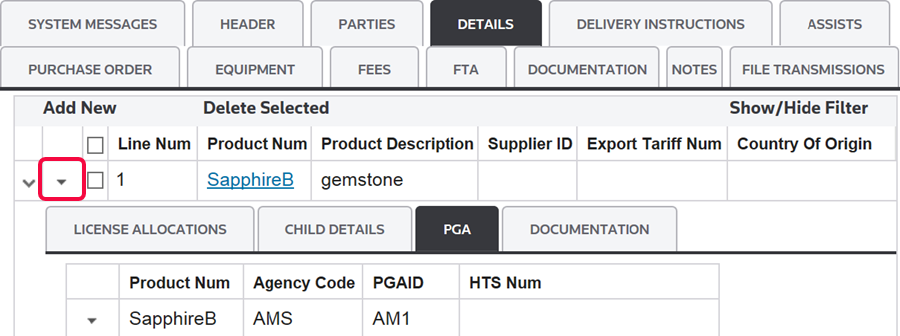
To review the map level PGA data for each agency associated to each line item:
- Click the downward arrow to the left of theLine Numcolumn. This will expand the record and open theLicense AllocationsandPGAtabs.
- Open thePGAtab.
important
Companies can choose to generate a report of the PGA data associated with each detail record on the shipment.
Related Content
-
Accessing PGA Data
Format: Article