
Foreign Trade Zone Management
The ONESOURCE Foreign Trade Zone solution allows PGA data to be stored either on the 3461 or the 7501.
To add PGA data to the 3461:
- ChooseCF3461 Weekly Estimatefrom theReportsmenu.
Any HTS Code that is flagged for PGA data will have a small
View
link appear on the line. Clicking a View
link will redirect you to the PGA screen where PGA data can be added for that line. After data is added to a 3461, the 3461 and its corresponding PGA data can be used as a template for the following week’s 3461 and PGA data. 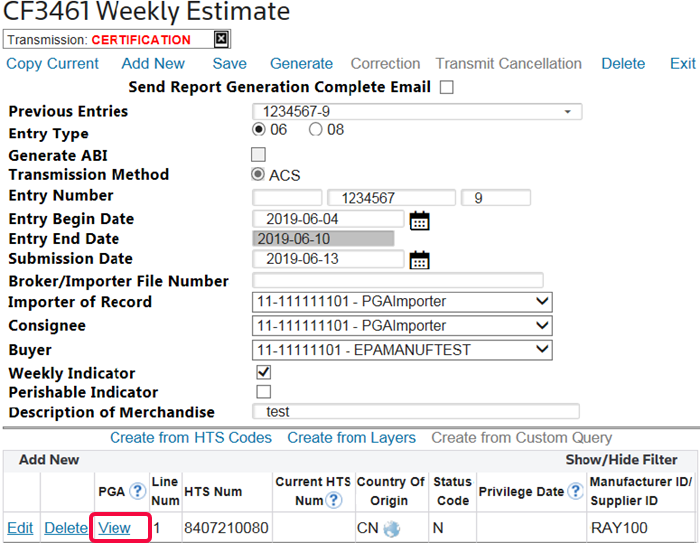
To add PGA data to the 7501:
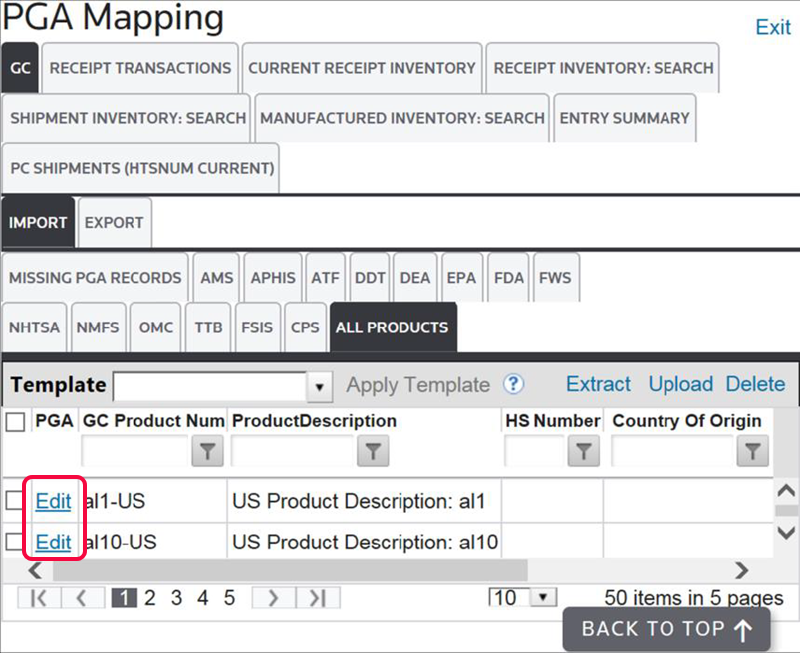
- ChoosePGA Managementfrom theReportsmenu.On this screen, you can add PGA data at various levels within ONESOURCE. PGA data can be added to the receipt layers, shipments, or tariff lines. This screen will also break down the various agencies that you may need to report to, as well as whether the data is required or may be disclaimed.From this screen, you can run a validation process on all the transactions visible in the grid.
To add or edit PGA data on a transaction:
- Choose a transaction from the grid.
- Click its correspondingEditlink on the left.
- Make any necessary changes and save.
For more information about the Foreign Trade Zone Management solution, please refer to the Foreign Trade Zone Management help documentation.
Related Content
-
Accessing PGA Data
Format: Article