
Release return process
The Release Return process allows administrators to check-in (close) locators regardless of their current status. Ensure no one is using the locator and no import/export processes are running before proceeding. Unsaved changes will be lost when freeing the locator.
note
To use this feature, you must be an administrator and have Release Return admin rights. An admin user with the right to use this feature must grant the right to any new admin user who needs to use this as well.
Release Return right
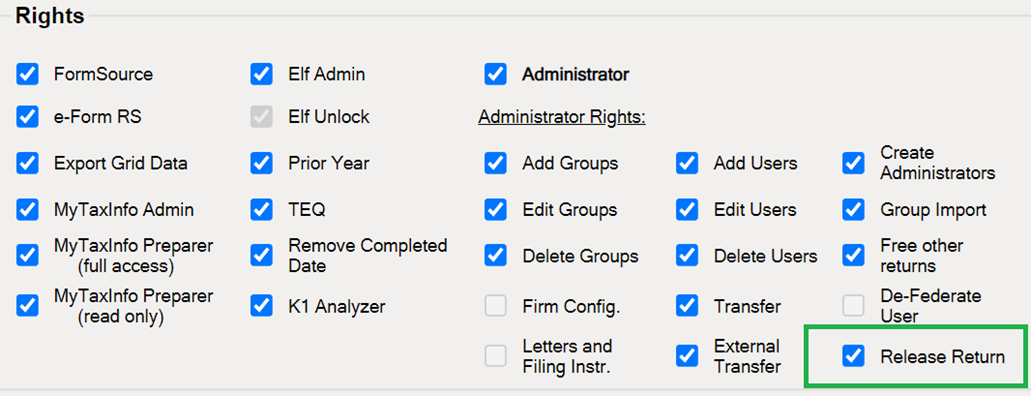
Release a single locator
- On the toolbar, selectReturns.
- Select the return you want to release.
- SelectInfoon the returns toolbar.
- SelectRelease Return.noteIf the locator is open you will get a message telling you it is open and the process will cancel all open returns on the machine. Do you want to continue freeing this locator? SelectOKto confirm.
- The remote free process will start now, and you will get a confirmation message with a batch ID.
Consolidated Returns (Topcons/Subsidiaries)
- Check if the locator is part of a consolidation by looking for theTopcon//Subcontab on the Support screen.
- If the locator is part of a consolidation, identify the Topcon (parent return).
- Navigate to the Returns screen.
- Select the checkbox for theTopcon.
- SelectInfo.
- RunRelease Returnon the Topcon. This will free all members of the consolidation.
- To see how many members the Topcon has, go to theSubsidiariestab in theReturns > Infoscreen.
Multiple Level Structures
If the Topcon is part of another consolidation, run
Release Return
from the top-level Topcon
to ensure all members are freed.Loop Structures
- If the process detects an error in the Topcon structure, it will abort to avoid running indefinitely.
- An error message will appear in theHistorytab of theInfoscreen.
- Contact support if this occurs, as there may be an issue with your consolidation structure.

