
1120L failed life returns
A life insurance company primarily issues life, annuity, and certain health insurance policies. However, if a life insurance company's annual statement doesn’t meet the IRS's reserve qualifications for a 1120-L tax return, it's considered as a
failed life return
. In such cases, the insurance company needs to file a 1120-PC tax return instead.Using the Life NAIC import
If you have a
failed life
tax return and want to import its Life Annual Statement, you need to first create it as an 1120-L tax return within our application. After creation, import the Life Annual Statement. Then, check the Failed Life
checkbox to convert the life insurance data from the 1120-L. Our system will then automatically populate the 1120-PC tax return. The 1120-PC tax return is the one displayed on the Tax Forms page for IRS filing, while the original 1120-L tax return is disabled.Subconsolidation of Failed Life Returns
Regardless of how a
failed life
company's data is initially handled or generated, its tax return (Form 1120-PC) is always included in the 1120-PC subgroup for consolidation purposes. This can be confusing because you might initially create a life return to utilize the Life Annual Statement transfer feature, only to then convert it to a 1120-PC return if it fails to meet the life insurance company qualifications. Ultimately, the PC subgroup subconsolidation comprises all 1120-PC returns intended for IRS filing. This includes returns originally designated as 1120-PC, as well as those converted to 1120-PC due to their status as failed life returns.Failed life conversion
Use the following steps to help you create your failed life return, if you are using the Life Annual Statement transfer method.
- Create a 1120-L return.
- Don't enter any numbers in the 1120-L Organizer at this point. Wait until after conversion to the 1120-PC to enter amounts in the Organizer.
- Transfer the Life Annual Statement.
- Turn offAuto Computein the 1120-L return.
- In the Failed Life Return section, select both checkboxes at the bottom of the screen. 1 checkbox turns off the 1120-L; the other turns on the 1120-PC area and the tax form. The failed life checkboxes are on the screen shown in the Organizer, thenGeneral Information, thenBasic Return Information, thenEntity Information.
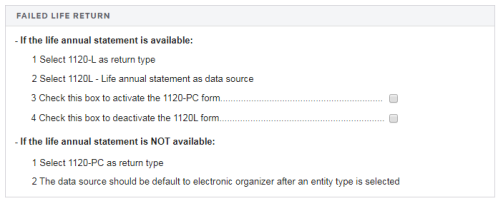
- The 1120-PC tax forms now appear in Tax Forms and the 1120-PC Organizer. You need to now make all your Organizer entries in the 1120-PC Organizer instead of the 1120-L Organizer.
- If this failed life return is to be consolidated with other returns, it needs to be included in a 1120-PC subgroup Subconsolidation.

