
NAIC Annual Statement line mapping chart
You can use the mapping chart to assign accounts for a federal chart of accounts to the lines of the NAIC Annual Statement. The mapping charts are year specific for a particular federal chart of accounts for either 1120L or 1120PC. The 1120L return type displays
Life
and Separate Accounts
NAIC types; the 1120PC return type displays Property/Casualty
, Health
, and Title
NAIC types.Follow these steps to create an insurance line mapping chart:
- In theHomewindow, select .
- On theNAIC Annual Statement Line Mappingscreen, select theYearfrom the dropdown list.
- Select theTax Return/NAIC Typefrom the dropdown list:
- 1120L - Life (default)
- 1120L - Separate Accounts
- 1120PC - Property/Casualty
- 1120PC - Health
- 1120PC - Title
- Select theChart of Accountsfrom the dropdown list. The unmapped federal accounts display in one pane, and the NAIC Annual Statement lines and mapped accounts display in the other pane.
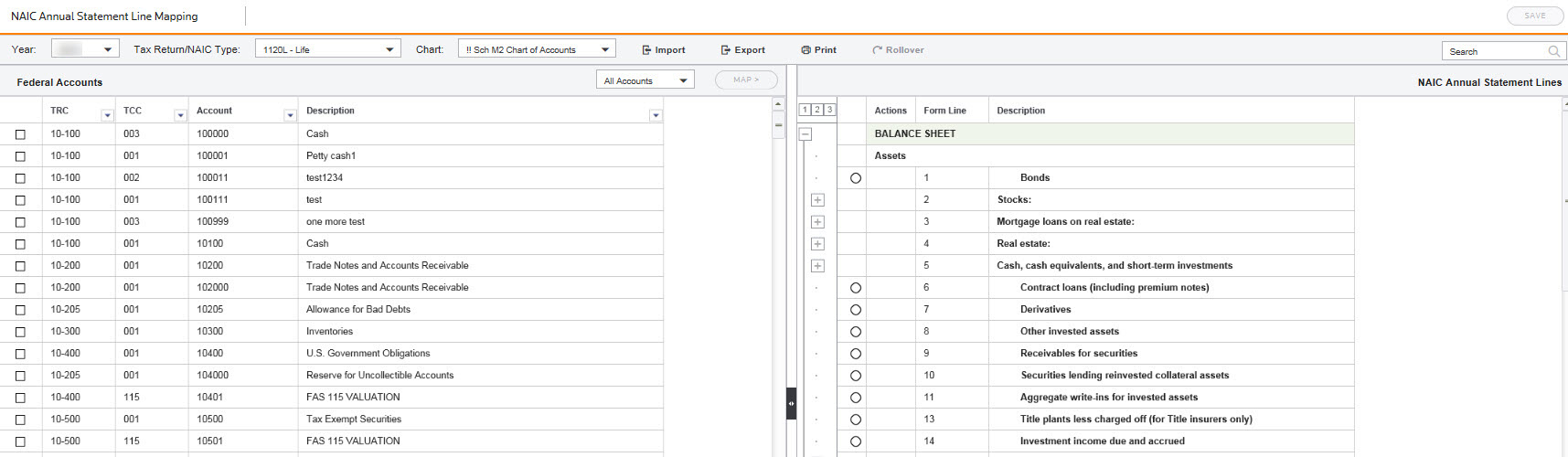
- In theAccountsdropdown list, you can choose to viewAll Accounts,Balance Sheet, orIncome Statementaccounts. Only accounts that are valid for the tax return type will be displayed.
- Enter an account number or description in theSearchfield
 and the system will search and display all the instances of the search item in the Assigned pane. If the search item is not found, you will get a message that says No matches found.
 - Select theFederal Accountyou want to map the account to theNAIC Annual Statement Linespane.
- SelectAddto map an account, orRemoveto remove the mapping.
- SelectExportto export a file to use as a template that you can then modify and import.
- SelectImportto import a data file. The 2 fields in the template include:
- NAIC Map Code
- Account Number

