
Review and revise consolidations
Review tools are available in Organizer to alert you to potential errors within the consolidation.
- Diagnostics and overrides
- Subview
- Consolidated Review screens
- Cross-Tie review
- Tax Summary
- Drill-down arrows
- Hyperlinks
- Workpapers
- Single Company Recomputation for states
- Combined reports for states
Subview
Subview's a special feature that allows you to review the amounts from each subsidiary included in the consolidation. This is especially helpful when processing multi-tiered consolidations.
- From any Tax Form or Organizer field within the consolidated return, position your cursor on the selected field and right-click for the context menu.
- SelectSubview. This shows the amounts from each subsidiary, parent, eliminations, or subconsolidation making up the total.
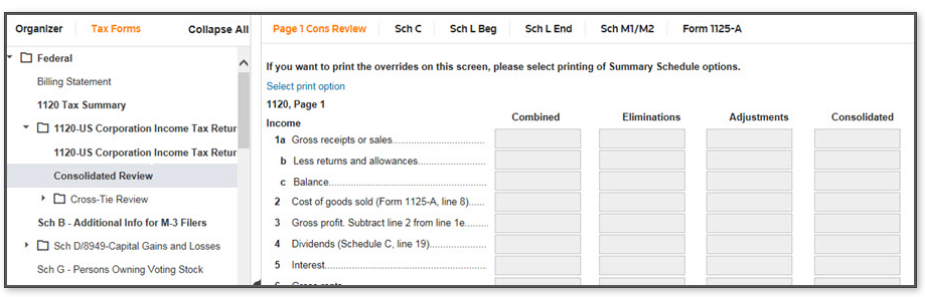
Consolidated Review
Go to
Tax Forms
, Federal
, 1120-U.S. Corporation Return
, and then Consolidated Review
.The Consolidated Review lets you review tax form amounts for pages 1 - 5 in columnar format.
Consolidated Review in columnar format
There are many reasons an adjustment appears in Subview and on the Consolidated Review Workpaper. Some of those reasons are:
- One of the member binders contains an override. This causes the override to appear on the Top Consolidation and therefore, the sum of the member binders doesn't equal the amount on the consolidated binder.
- Based on the law, a reclass was required. This is commonly found on Schedule D and on Form 4797.
- Amounts were entered inconsistently. Example, one member entered data on a detail screen while other members entered similar data in an override section, such as Form 4562 detail.
Cross-Tie Review
Also in Tax Forms, the Cross-Tie Review allows you to review total amounts for any line with cross-tie codes available.
Single Company Recomputation
You can find the
Single Company Recomputation
in Tax Forms
, State
, Common State
. Use this to view adjustments made to the federal return to calculate the starting adjustable taxable income for the states. Although the subsidiary's used in a federal consolidation, it may be recognized as a single entity for state purposes. This workpaper replaces the need for a proform single company return and can be printed and attached to the return.Combined reports
You can use combined reports to view combined forms and workpapers associated with the state. You can find these reports in
Tax Forms
, State
, [name of state]
, Combined Reports
.Related Content
-
About federal consolidations
Format: Article

