
Importing rows or columns with blank cells
Importing files that contain columns (for row processing mode) with blank cells, such as shown in the figure below, may result in data not importing into the correct data set.
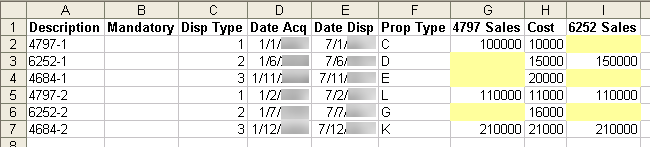
To resolve this problem, cells that are blank should be filled with spaces. In Excel, do the following:
- Select columns G and I.
- SelectEdit, thenReplace.
- Leave theFind whatfield blank.
- Place the mouse in theReplace withfield.
- Press the space bar once.
- SelectReplace All.
- Save the file.

