Anomaly types
Anomaly Detection identifies 3 types of anomalies: Tax Rate, Tax Authority, and Exemption Certificate.
Tax rate
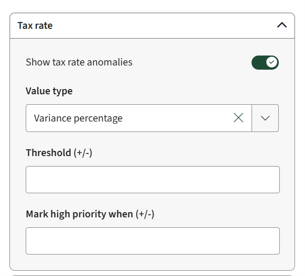
A Tax Rate anomaly occurs when the tax rate or flat fee that applies to a jurisdiction differs from the historical behavior for the same pattern.
Tax authority
A Tax Authority anomaly occurs when an authority that always applies to a pattern is missing, or when one that never applies appears. This includes changes at the country, state/province, county/district, or ZIP Code level.
Exemption certificate
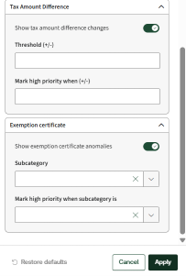
An Exemption Certificate anomaly occurs when a line's certificate is missing, newly added, or different from the most recent historical certificate. For this type, the system also validates the customer number.
Thresholds
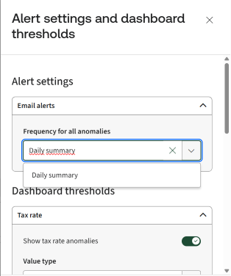
Configure thresholds for all 3 types in the
Alert Settings
and Dashboard Thresholds
panel. Tax Rate and Exemption Certificate anomalies can be shown or hidden. Each type’s threshold is set as a percentage variance or a numeric amount difference.Each user manages their own settings. The system doesn’t show anomalies that fall lower than a user's configured threshold on that user's dashboard. It also doesn’t send a notification for them.
Priority
Threshold
and Mark high priority when
accept numbers with up to 16 digits before the decimal point and up to 2 decimal places. - Comparisons are inclusive and use absolute values.
- An anomaly appears when its variance is at or greater than the Threshold. You mark it a high priority when it reaches or exceeds the same limit.
- The high priority value needs to be greater than theThreshold.
- For Exemption Certificate, mark a subcategory ashigh priorityonly if it is also selected in Subcategory.
Priority is calculated each time anomalies are retrieved, using your current settings. If you change
Mark high priority when
, anomalies that were already detected are re-evaluated, and 2 users with different settings can view different priorities for the same anomaly. Email alerts have 1 setting in the same panel. Anomalies are set to
Daily summary
, Weekly summary
, or Off
.