
Create a custom rule for the IBS-City authority
Add a custom IBS-City rule with a rule code, full-year dates, and Brazil CBS-IBS as the caluculation method, then save.
After you've created a custom authority, you can add a custom rule for the IBS-City Authority:
- On theCustom Authoritiespage, select the custom authority you want to edit.
- Go to theRulestab.
- Enter theRule Code,Start Date, andEnd Date.noteTheStart Dateshould be the 1st day of the year, for example January, 1, 2026, and theEnd Dateshould be the last day of the year.
- Select aRule OptionandRate input typefrom the dropdowns.
- For theCalculation Method, selectBrazil CBS-IBS.
- SelectSave.
Test the rule
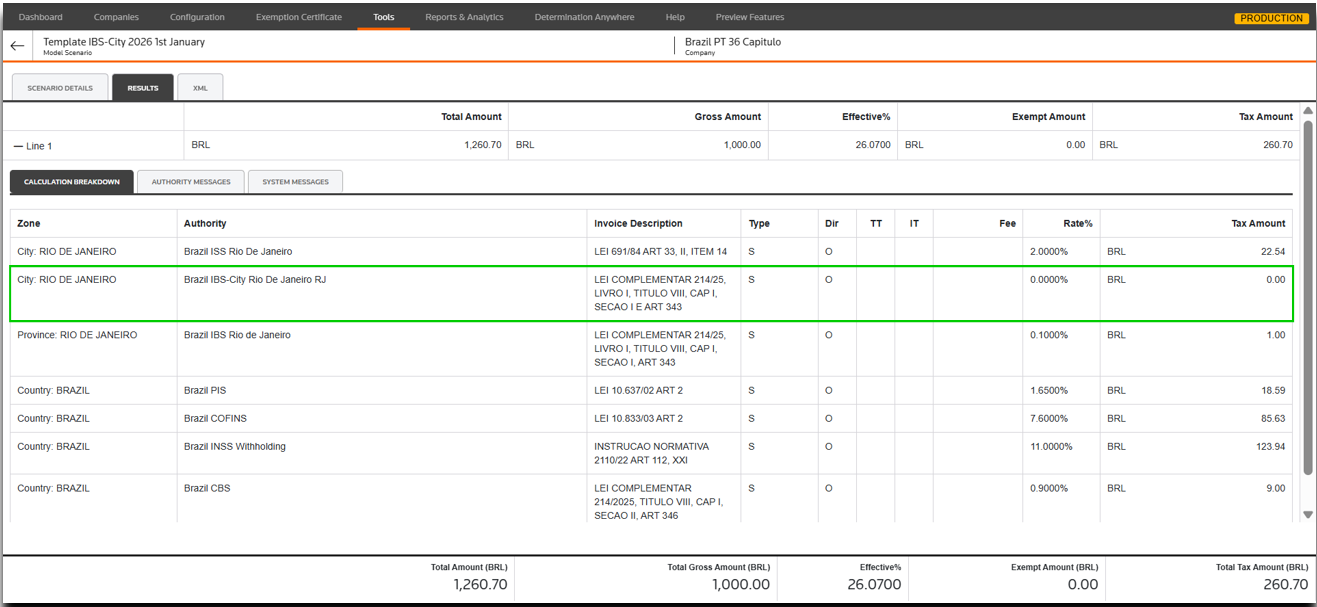
- Create a test scenario with a date after the 1st day of the year.
- Go toToolstab, then theResultstab.
- Select theCalculation Breakdowntab.
- Make sure the IBS-City rule is showing in the Authority column and that the calculation is working correctly.
Related Content
-
Create a custom authority
Format: Article