Negate taxes for VAT company admin option
The Negate Taxes for Vat company admin option can help you avoid the confusion of seeing 2 positive VAT tax values result in a 0.00 total tax amount. When this option gets used, negative tax values are shown in the output (O) direction and positive tax values are shown in the input (I) direction when both tax block directions (input and output) are present.
The criteria for this option includes:
- This option's primarily for EU countries using VAT.
- This option must be set to Yes if you want to show negative tax values for VAT tax in the output (O) direction.
- This option's applicable only when the company role is Buyer.
- This option's used only when both tax block directions are presented.
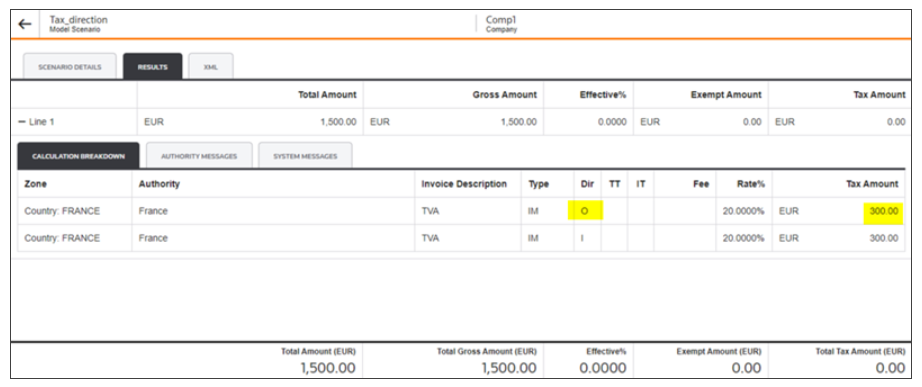
Option isn't set to Yes
When the
Negate Taxes for VAT
company admin option isn't set to Yes but all other criteria's met, The Direction (Dir) column will show input (I) and the output (O) with positive values in the Tax Amount column. The result isn't affected but it can be confusing to see the results of 2 positive values as 0.00.Negate Taxes for VAT not set
Option's set to Yes
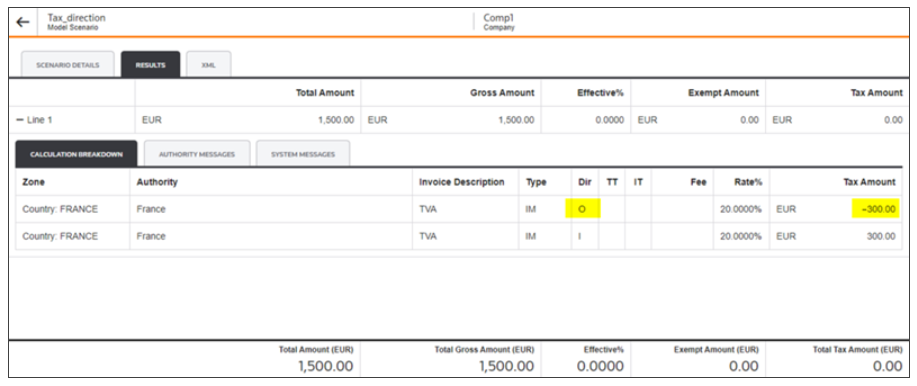
All of the criteria's met, including setting the
Negate Taxes for Vat
company admin option to Yes. In the Direction column, the input (I) direction shows a positive value in the Tax Amount column and the output (O) direction shows a negative value. This would be the same if you were to view the XML Output.Negate Taxes for VAT option set to Yes