
2.2.4.1 integration for Coupa
ONESOURCE Indirect Tax for Coupa (OIDTC) version 2.2.4.1 is an enhancement of version 2.2.4.0 to support account instruction keys for reverse charge use cases in ONESOURCE source system response to Coupa as well as a maintenance release to fix a bug on OIDTC v2.2.4.0.
Functional change
Enhancement: Support for Sending Account Key in Reverse Charge Responses to Coupa
Issue:
In OIDTC version 2.2.4.0, the default integration maps the Account Key for reverse charge invoices from the tax engine response field erp_tax_code
to the Coupa invoice ONESOURCE Tax Bucket
field. This means that when the Account Key is present in erp_tax_code
, it is populated in the ONESOURCE Tax Bucket
field in the Coupa–ONESOURCE integration.However, customers require the Account Key to be returned in the
ONESOURCE Tax Code
field (instead of, or in addition to, the ONESOURCE Tax Bucket
field) for reverse charge invoices. Their downstream posting and accounting processes, including prebuilt extraction programs and ERP integrations, are designed to consume the Account Key specifically from the ONESOURCE Tax Code
field. Without the Account Key in this field, reverse charge postings, VAT accounting, and related GL integrations may not function as intended or may require custom workarounds.Solution:
Enhance OIDTC 2.2.4.0 to ensure the OIDTC integration transmits the Account Key in every Reverse Charge response from the Tax Engine to Coupa for all reverse charge scenarios.The benefit of Account Key transmission is reliable downstream posting to ERP/GL: the Account Key enables correct account derivation for reverse-charge lines, reducing posting failures, suspense accounts, and manual journal corrections while improving straight-through posting rates.
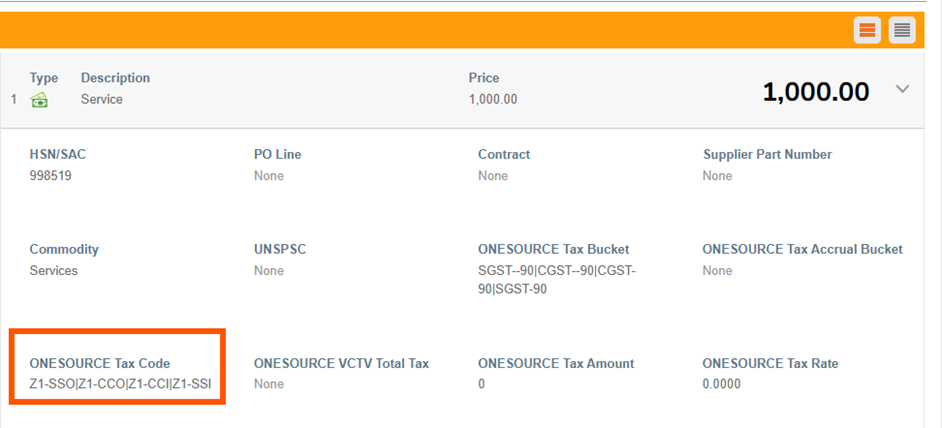
At line level, the Coupa UI will display the Account Key in the
ONESOURCE Tax Code
custom field.ONESOURCE Tax Code custom field overview for Reverse-Charge invoices
Standardize the ONESOURCE Tax Bucket so reverse-charge lines carry both Tax Code and Account Key for downstream posting and audit clarity.
Previous format (for reference):
- Pattern: Tax Code
- Example: ONESOURCE Tax Code = V1
New format:
- Pattern: Tax Code – Account Key
- ERP Code format: Tax Code − Account Key (Account Instruction)
- Tax Code: always two characters
- Account Key: always three characters
India Multi Tax Reverse Charge ONESOURCE Tax Code Example:
ONESOURCE Tax Code = Z1-SSO|Z1-CCO|Z1-CCI|Z1-SSIField legend:
- Tax Code: Z1
- Account Key:
- SSI and CCI = TAX-DIRECTION I tax block Account Keys (3 characters)
- SSO and CCO = TAX-DIRECTION O tax block Account Keys (3 characters)
ONESOURCE IDT for Coupa unable to process tax calculation requests (PR/PO change document types) for new customers
Issue:
As-is OIDTC version 2.2.4.0 contains a bug that prevents the system from correctly identifying and using specific Coupa instance OAuth credentials generated from the Coupa system to send a response back to the Coupa instance after successful tax calculation. This bug is only applicable to new Coupa instances.As a result, OIDTC v2.2.4.0 cannot generate a Coupa response after calculating tax results on Purchase Requisitions (PRs) and Purchase Orders (POs), and the tax information is not returned to the Coupa UI. Consequently, tax calculation fails on Coupa PR/PO change document types.
Solution:
Debug the OIDTC v2.2.4.0 integration to correctly validate customer OAuth credentials and generate Coupa responses with tax results for all new customers. The validated tax results are now successfully returned to the Coupa UI for PR/PO change document types, ensuring that tax calculation results are correctly updated on Coupa purchasing documents as expected.Related Content
-
Integration for Coupa
Format: Article