Create dynamic ERP code mappings to be used with Oracle Fusion Tax integration
Content to be added before enhancing the synchronize extract payload. You need to create the DYNAMIC ERP Code Mapping in ONESOURCE Determination to get the correct tax rate code from the system.
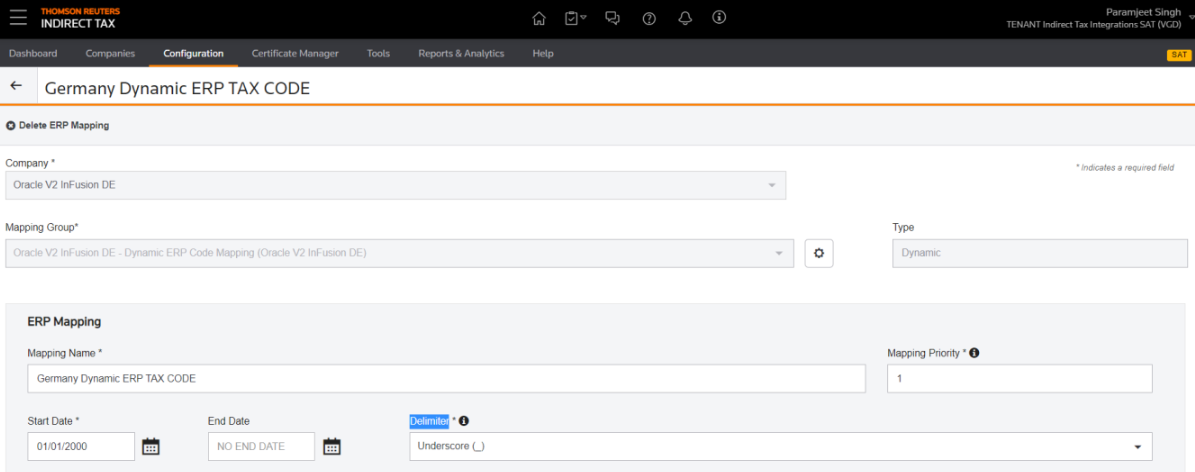
- Go to ONESOURCE Determination,Configurations,Mapping, and thenERP Code Mapping.
- SelectAdd ERP Code Mapping.
- Select the company for which you want to create the mapping.
- The mapping group gets populated automatically as the default for the company.
- SelectDynamicfor theType.
- Enter a mapping name.
- Amapping priorityspecifies the order in which the mapping gets applied and evaluated. It populates automatically; however, you can change the order based on your requirements.
- SelectDelimitervalues asunderscore(_).
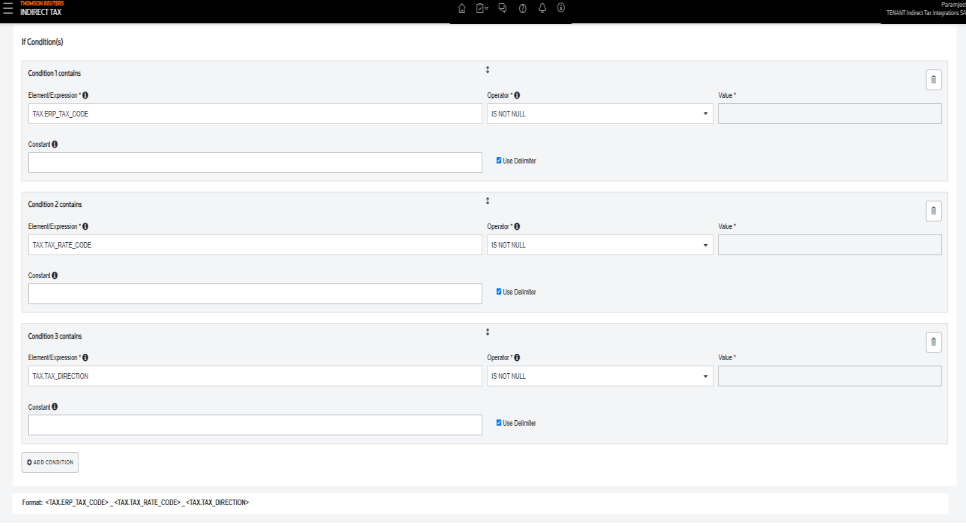
- Create theseconditions, and thenSave.
- Condition 1 - TAXERP_TAX_CODE IS NOT NULL, and select Use Delimiter.
- Condition 2 - TAXTAX_RATE_CODE IS NOT NULL, and select Use Delimiter.
- Condition 3 - TAXTAX_DIRECTION IS NOT NULL, and select Use Delimiter.
- Format: <TAXERP_TAX_CODE>_<TAXTAX_RATE_CODE>_<TAXTAX_DIRECTION>