
Oracle Fusion BIP enhancement module/BU BIP execution
Corporations using Oracle as their Enterprise Resource Planning (ERP) system can simplify their worldwide Indirect Tax requirements by implementing ONESOURCE Indirect Tax Suite. The suite includes Determination, Integration for Oracle Fusion Tax, Contents, Reporting, and Compliance.
Oracle validated and approved the ONESOURCE Integration for Oracle Fusion Tax for listing on the Oracle Cloud Marketplace. Through the Oracle Partner Network initiative, Oracle confirms that third‑party software solutions adhere to integration standards and best practices, tests them for functional and technical soundness, and verifies that they operate and perform as documented. Oracle lists the ONESOURCE Integration on the Oracle Cloud Marketplace.
note
This release is in support of Oracle Financials Cloud for BIP enhancement from ONESOURCE.
Support protocol
Thomson Reuters Tax & Accounting Indirect Tax builds, maintains, and owns the ONESOURCE Integration for Oracle Fusion Tax. A dedicated group of Oracle Business Systems Analysts and Quality Assurance staff in this business unit built the product. We follow Oracle best practices and development standards and strive to minimize this solution’s impact on your Oracle environment. If you encounter an issue with the ONESOURCE Integration and Compliance Integration for Oracle Fusion Tax, contact us for support.
Definitions
Terms/acronyms referenced within this documentation include:
- Integration UI: Oracle Fusion Integration User Interface
- BIP: Business Intelligence Publisher
Purpose of this document
This document provides a comprehensive guide to the BIP enhancement. The integration now runs distinct BIP reports based on the originating Financials Module (for example, Accounts Payable (AP), Accounts Receivable (AR), Procurement (PO), Order Management (OM)), improving performance by running queries only for the specific Business Unit/Module.
BIP enhancements: Segregation by business unit/module
The ONESOURCE Integration for Oracle Fusion can run the Attributes BIP Report to retrieve additional data elements from Fusion Financials during tax calculation. The current design uses a single BIP report across all business units and modules. With this enhancement, the ONESOURCE Integration will let each Business Unit/Module combination use a different BIP report.
Functionality
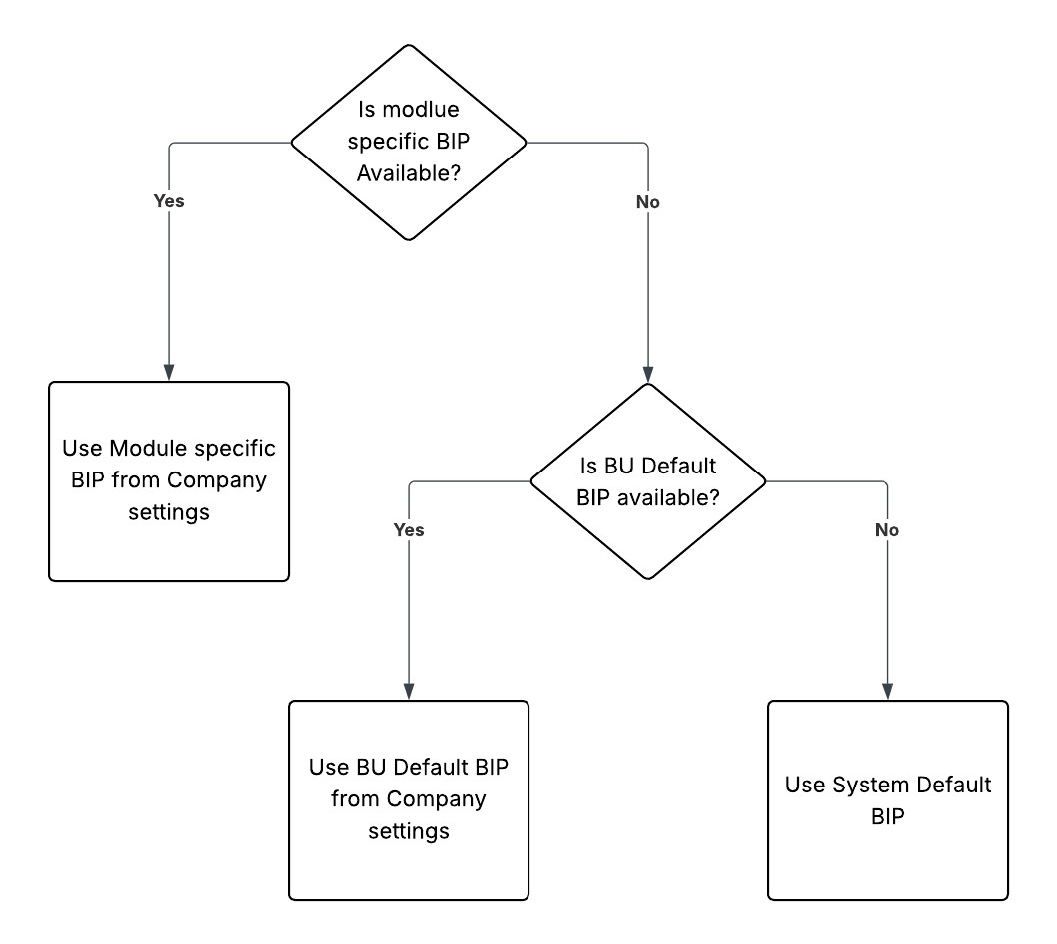
Is module-specific BIP available?
- If yes, use the module-specific BIP from Company Settings.
- If no, is BU default BIP available?
- If yes, use the BU default BIP from Company Settings.
- If no, use the system default BIP.
Configuration in Integration UI
In , edit the company settings and enter details in the
BIP Override Settings
tab.Example setup:
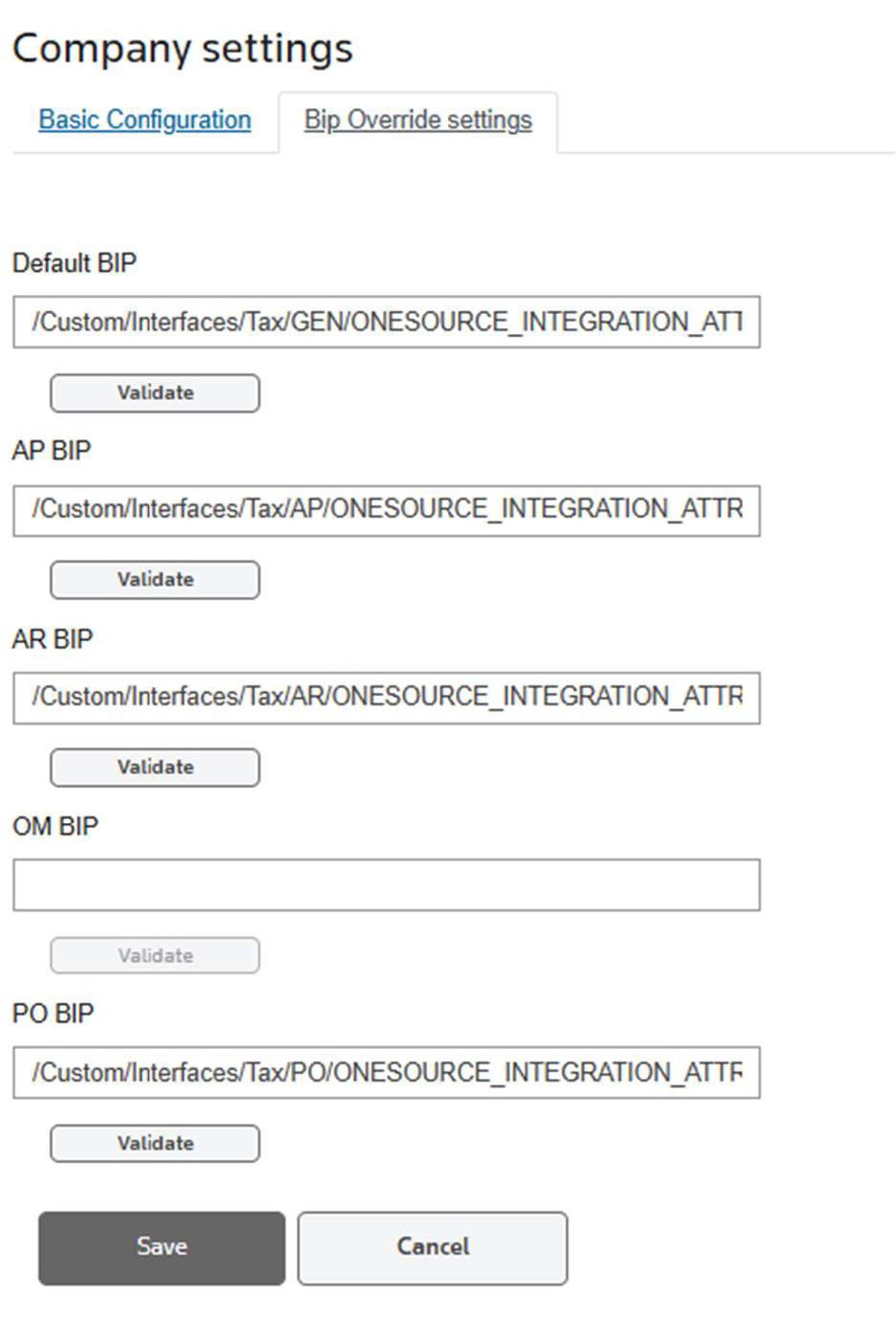
- Default BIP: /Custom/Interfaces/Tax/GEN/ONESOURCE_INTEGRATION_ATTRIBUTES.xdo
- AP BIP: /Custom/Interfaces/Tax/AP/ONESOURCE_INTEGRATION_ATTRIBUTES.xdo
- AR BIP: /Custom/Interfaces/Tax/AR/ONESOURCE_INTEGRATION_ATTRIBUTES.xdo
- PO BIP: /Custom/Interfaces/Tax/PO/ONESOURCE_INTEGRATION_ATTRIBUTES.xdo
This setup achieves the following:
- For calls from the AP, AR, and PO modules, the system executes the BIP report specified at the module level.
- For calls from the OM module, the system executes the default BIP report at the company level.
Select
Validate
to check if the report exists in the path provided. The system will still let you save the configuration if the validation fails. This lets you upload the report at a later state.note
The transaction will receive an error at runtime if the reports aren't set up during tax calls.