
Reverse transactions
Reversals negate an original transaction in the audit database after a refund, return, or other change between a merchant and customer. By knowing the reversal types, you can choose the correct method and keep audit records accurate.
Reverse transaction after 2-year period
Beginning April 15, 2025, ONESOURCE Determination will base the reversal of a transaction using only the 1st 2 years from the invoice's transaction date. If the system initiates a reverse transaction within this timeframe, it will process the reversal according to the reverse transaction logic. However, if someone attempts a reverse transaction after the 2-year period, Determination won’t reverse the previous transaction.
Reverse transactions overview
Double-entry systems record transactions as debits or credits, so ideally you reverse the original transaction instead of deleting it. In that respect, transactions or Invoices processed by the systems (Enterprise Determination Cloud & Determination Anywhere (DA)) are never deleted. So, for the reasons for a transaction to be reversed, a credit memo matched to an existing invoice should be created.
The following constitute mandatory attributes to be included in the customer transactional system (source system) request to the ONESOURCE Determination tax engine to calculate the taxes:
Mandatory elements (JSON / XML) | Description |
|---|---|
callingSystemNumber/calling_system_number | A descriptor of the calling (source) system sending the transaction. |
companyName/external_company_id | The identifier used by companies when calling Determination. This element tells Determination which company is calling it, letting Determination to use the correct company-specific settings. |
companyRole/merchant_role | The role the company plays in each transaction: B for Buyer, M for mediator, S for Seller. |
documentNumber/invoice_number | This number is passed through to the audit tables and acts as a reference in the audit tables as well as for credit transactions. |
externalCompanyId/external_company_id | The unique identifier used by business application to indicate which company to use in Determination. |
hostSystem/host_system | The name of the ERP instance sending the transaction. |
documentDate/invoice_date | The date of the invoice or document. |
uniqueDocumentNumber/unique_invoice_number | The unique identifier for invoice, as assigned by the ERP system or generated by ONESOURCE Indirect Tax Determination. Note that for the Unrelated Reversal process, the value here can't match with an existing value in the audit database. |
merchantId/Merchant_ID | The root tenant UID. The unique identifier to indicate a company to use in Determination. |
The following attributes determine the uniqueness of a transaction invoice in the audit database:
- HostSystem/Host_System
- CallingSystemNumber/Calling_System_number
- uniqueInvoiceNumber/Unique_Invoice_NumbernoteWithout this information, Determination uses {ExternalCompanyID|Invoice_Number|Company_Role} to create a unique invoice number
- merchantId/Merchant_ID
These 4 attributes are referenced as Unique Key in the following information.
Reversal of transactions
When you reverse a transaction, the system negates the original transaction in the audit database and creates a new record that matches your last request. The reversals can be differentiated as Unrelated Reversals, Implicit Reversals, and Explicit Reversals.
Unrelated Reversals: This is the recommended best practice for reversing a transaction. If the source system creates a reversal/cancellation document, or a record with a separate documentNumber, then the value can be passed as a negative. The system doesn't perform a reversal. It records both transactions separately in audit, and you can use
Original Invoice Number
to identify their relationship.It's recommended to have reference to the original transaction for this process:
Optional elements | Description |
|---|---|
originalDocumentId | The original document ID as shown on the document in the source system. Not used in calculations. |
originalDocumentDate | The date of the original transaction. Used in Date Determination Rules. |
originalDocumentNumber | This number enables a credit invoice to be associated with an original invoice in the audit tables for reporting purposes. |
Implicit Reversal: This process assumes the source system passes Unique Key attributes, which match the data to an existing record and support partial reversals if needed.
If the Unique Key attributes that you send to Determination already exist in Audit, Determination maintains the original record. For example, the original record is for $100.00.
Determination then creates a reversal of that document. It also creates a new record that represents the latest document information that you passed. For example, the new transaction is for $25.00.
There will be 3 records in the audit:
- Original document 1234, line 1 = $100.00
- Determination Reversal document 1234, line 1 = -$100.00
- Resubmitted reversal document 1234, line 1 = $25.00
Alternatively, if a transaction is sent with matching Unique Key attributes and a negative amount, there will be 3 records in audit:
- Original document 1234, line 1 = $100
- Determination Reversal document 1234, line 1 = -$100
- Resubmitted reversal document 1234, line 1 = -$100
Explicit Reversal: This process follows the assumption that the source system wants to do a full reversal or to void the original transaction fully.
Determination maintains the original record (say, $100.00), and then creates a new record of that document representing the latest document information passed. There will be 2 records in the audit:
- Original document 1234, line 1 = $100.00
- Resubmitted reversal document 1234, line 1 = -$100.00
For Explicit Reversals, the entire payload for the request to the tax engine is not required, and only the basic elements are needed to do the reversal.
- For transaction requests utilizing Rest, a separate end point needs to be reached. The API documentation is available in the Developer Portal.
- For transaction requests utilizingSOAP, theIS_REVERSEDflag should be set toTRUE.<IS_REVERSED>true</IS_REVERSED>.
The following diagrams show the high-level flow of the reversal process. They cover both Enterprise Cloud and Determination Anywhere applications on the OCI & AWS platforms, where the audit database resides. AWS is Amazon’s Web Service cloud platform. OCI is Oracle’s Cloud Infrastructure. The Enterprise Cloud Determination application is hosted on both these cloud platforms, with DA server-side components hosted there for DA customers.
Process sequence visualization
It is to be understood that the tax engine itself, whether Enterprise Cloud or DA, doesn’t perform any reversal activities. Instead, an acknowledgment will be returned for the request immediately; the reversal is committed asynchronously/offline to the audit database.
Customers can validate the transactional records in reports (NGRA). This applies to both SOAP & Rest web service requests on AWS Enterprise Cloud & DA, except in the case of OCI. There is an ETL process that installs the data from the Audit DB to NGRA for reporting purpose.
With Enterprise Cloud Determination on the OCI platform, the reversal happens at the same time as the transaction. When the source system receives the confirmation, the Audit DB has already committed the reversal.
If a matching invoice doesn't exist for an explicit reversal, the system doesn't record the reversal transaction in the database. You can expect the following response from the tax engine:
<MESSAGE>
   <LOCATION>AuditData.saveFullInvoice()</LOCATION>
   <CATEGORY>CALCULATION</CATEGORY>
   <CODE>EXISTING_INVOICE_NOT_FOUND</CODE>
   <MESSAGE_TEXT>An invoice was submitted to be reversed, but the invoice does not exist in audit.</MESSAGE_TEXT>
   <SEVERITY>0</SEVERITY>
</MESSAGE>
With Enterprise Cloud Determination on the AWS platform, the source system receives an acknowledgment that the transaction is processed. The reversal activity occurs offline from the tax calculation process, outside of the tax engine.
For an explicit reversal, the tax engine responds the same way whether or not a record previously exists. It also responds the same way whether or not the reversal activity later occurs. The response is:
<MESSAGE>
   <LOCATION>AuditData.save</LOCATION>
   <CATEGORY>CALCULATION</CATEGORY>
   <CODE>AUDIT_SUCCESS</CODE>
   <MESSAGE_TEXT>Audit data saved successfully.</MESSAGE_TEXT>
   <SEVERITY>0</SEVERITY>
</MESSAGE>
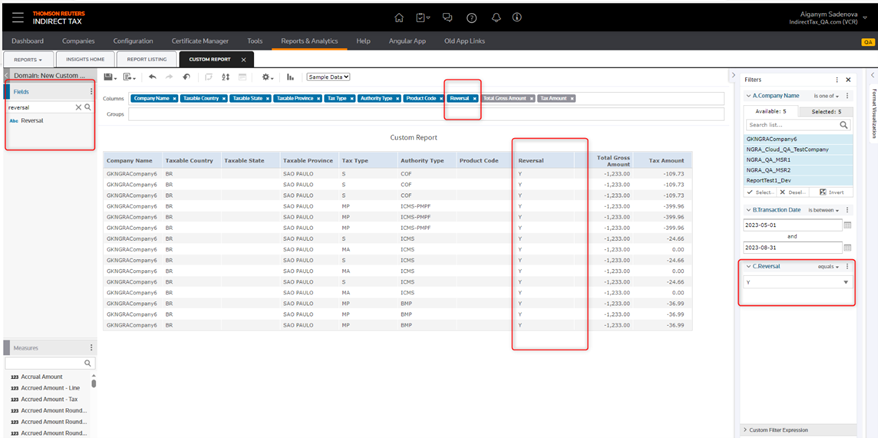
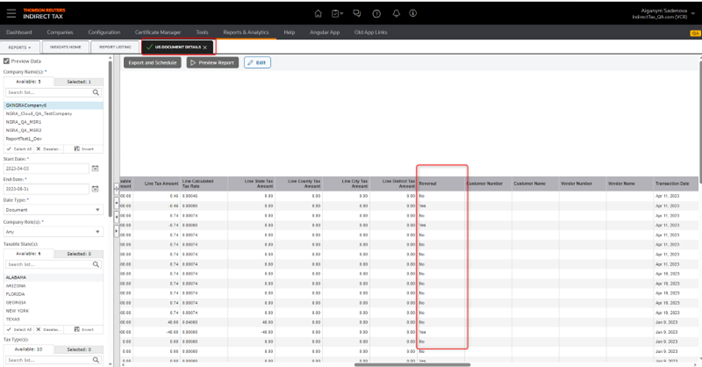
The process attempts to find the matching invoice in the audit database a few times. If it still cannot find a match, it inserts the record into the audit database. Such records could be identified from reports (NGRA) as follows:
- User can create a Custom report, add the Reversal column to the template, and get a filtered dataset by selectingReversal = ‘Y’.
- Run the standard US Document Details report, and then selectYesin theReversalcolumn to filter the data.
With reversals on DA, whether on AWS or OCI platforms, the source system receives an acknowledgment that the transaction is processed. The reversal activity occurs offline from the tax calculation process, outside of the tax engine.
For an explicit reversal, the tax engine responds the same way whether or not a record previously exists. It also responds the same way whether or not the reversal activity later occurs. The response is:
<MESSAGE>
   <LOCATION>AuditData.save</LOCATION>
   <CATEGORY>CALCULATION</CATEGORY>
   <CODE>AUDIT_SUCCESS</CODE>
   <MESSAGE_TEXT>Audit data saved successfully.</MESSAGE_TEXT>
   <SEVERITY>0</SEVERITY>
</MESSAGE>
The transaction that was submitted as a reversal will try to be matched up with its existing invoice. If the process finds no match, the transaction stays in a Failed queue. Because the system does not insert it into the audit database, you must look it up manually as an operational process.
The DA Client does not keep historical transactions because it offloads processed transactions to the Audit DB as quickly as possible.
For an Implicit Reversal, the tax engine returns the success message response noted previously when it processes the tax calculation request without errors. This applies to all the previous cases.
Related Content
-
Determination Anywhere 2024.4 Release Notes
Format: Article