
Use fields and measures in custom reports
You can insert data into a report table by adding fields and measures from the data source.
Fields
Fields contain non-numerical data, such as addresses and dates. Fields are shown in blue in the user interface.
Measures
Measures contain numerical or calculated data, such as sales figures. You can create new measures by adding calculated fields to the measures. Measures are shown in gray in the user interface.
Create calculated fields and measures
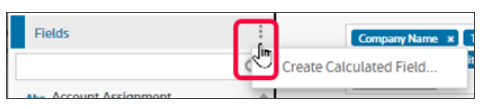
When creating a custom report, you can go to the kebob selection and select
Create Calculated Field
or Create Calculated Measure
.Kebob field
Related Content
-
Create a custom report from a standard report
Format: Article,
1 min read
Article,
1 min read
-
Aggregate functions in calculated fields and measures
Format:
Article,
2 min read