
R2.0.0 April 27, 2026 release notes
Party Name column and filter added to documents and error grids
- Added a newParty Namecolumn to the Documents grid, displaying the customer name for AR (Accounts Receivable) invoices and the supplier name for AP (Accounts Payable) invoices, giving users greater clarity and visibility into invoice data at a glance.
- Introduced a newParty Namefilter on the Documents grid, allowing users to search and narrow down invoices by customer or supplier name without needing to know the invoice direction upfront.
- TheParty Namefilter searches across both AR and AP transactions by default when no invoice direction is specified by the user, ensuring comprehensive search results regardless of transaction type.
- Extended theParty Namecolumn and filter to the Errors transaction grid, ensuring a consistent user experience and search capability across all relevant grid views.
Tax Identification number added to Documents page
- AddedTax Identification Number (TIN)to the document data details view, enabling users to distinguish invoices that belong to the same legal entity operating across different countries.
- TheTax Identification Numberfield gracefully handles missing data — when a TIN is not available for a given invoice, the field is left blank while the invoice remains fully visible and accessible with all other available information intact.
- Introduced a newTax Identification Numberfilter on the Documents page, allowing users to search and narrow down invoices by TIN for faster and more precise identification of legal entity-specific records.
Pagero archive index file retrieval via OEI API
- Introduced a newAttachmentsaccordion on thePreviewtab of theDocumentspage, enabling users to view and download theArchiveIndex.xmlfile directly from the document preview section.
- TheArchiveIndex.xmlfile is surfaced within theAttachmentsaccordion with dedicatedViewandDownloadactions, allowing users to access the archive index without leaving the document preview experience.
- TheAttachmentsaccordion is conditionally displayed — it only appears when theArchiveIndex.xmlfile is present in the document's attachments, keeping the UI clean and uncluttered for documents that don't contain an archive index.
- The newAttachmentsaccordion is positioned last in thePreviewtab, appearing after the existingInvoice,Clearance, andBusinessaccordions, and follows the established accordion design patterns for a consistent user experience.
- This enhancement supportslegal compliancerequirements by providing users direct access to theArchiveIndex.xml, which contains cryptographic hashes and references for the source, target, and presentation files associated with a transaction.
ONESOURCE LogCenter: Enterprise-Grade troubleshooting
The legacy Unified Logging system is being replaced by the
LogCenter
, a centralized hub designed for high-volume invoice lifecycles.- The ONESOURCELogCentercentralizes the management of application logs.LogCenteralso enhances the way you monitor and troubleshoot ONESOURCE products by providing a single, unified platform for log collection, search, and export.
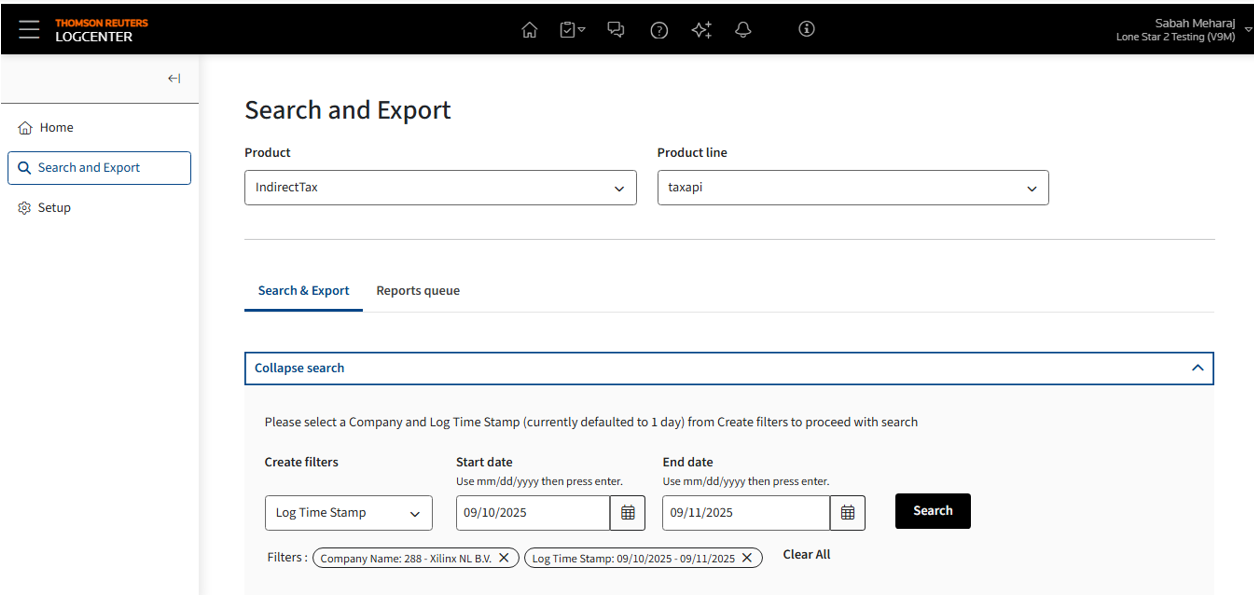
- LogCenterwill fully supersede the existingUnified Loggingfeature, providing a standardized logging infrastructure.
- The system seamlessly integrates with all ONESOURCE products—both cloud and on-premises—allowing for comprehensive log visibility, simplified compliance, and streamlined troubleshooting.
- Significantly faster log search and retrieval times due to Parquet optimization and detailed partitioning.
- LogCenteroffers a secure, structured, and easily searchable record of all key user activities and system events.
- A step-by-step guide about ONESOURCELogCenteris included in OEI2026.R2.0.0 User Guide.
- The legacyUnified Loggingsystem is being replaced by theLogCenter, a centralized hub designed for high-volume invoice lifecycles.
- Extended Data Retention:Visibility has been expanded from the previous 30-day limit to 6 months of historical logs, supporting long-term audit requirements for high-payload environments.
- End-to-End Traceability:Using a uniqueCorrelation ID (Transaction ID), users can now track a single document's journey across all integration points (Core, Oracle, Coupa, SAP Ariba, etc.) in one unified view.
- Performance & Export:Experience significantly faster response times for log queries and the ability to Export to CSV for offline analysis and reporting.
- Granular System Control:Administrators can now switch on and off the log capturing at the specific service level (e.g., Oracle, SAP, Coupa or SAP Ariba) to optimize data focus.
noteUnified Loggingremains available in the UI until the R3 release for viewing historical data. However, all new log activity starting in R2 must be managed via theLogCenter.
New ERP connectivity: Coupa integration (AP invoice and business response)
Overview
OEI continues to expand its ecosystem with a native connector for
Coupa AP Invoices
.- Automated Compliance:Seamlessly bridge the gap between procurement and tax. Invoices generated in Coupa flow directly into ONESOURCE E-Invoicing for tax validation and global mandate clearance.
- Synchronized Statuses:Legal statuses and PDF clearances are pushed back into Coupa, ensuring the procurement "Source of Truth" is always up to date.
This release introduces AP Invoice posting from ONESOURCE Pagero E-Invoicing to Coupa and Business Response from Coupa into ONESOURCE Pagero E-Invoicing application. This enhancement improves visibility, compliance, and operational efficiency to view the AP Invoice posting and present status of the AP Invoice.
Key update
AP Invoice posting to Coupa and Invoice Status Fetch from Coupa via Coupa REST API
ONESOURCE now connects to Coupa using the Coupa REST API for AP Invoice Posting and to fetch invoice statuses and update the Business Status column within the ONESOURCE application.
Mapping of supported Coupa Invoice document status in ONESOURCE Pagero:
Coupa invoice status | ONESOURCE Business status |
|---|---|
On Hold | On Hold |
Pending Approval | Notification |
Approved | Recipient Accept |
Rejected/Disputed/Cancelled/Void | Recipient Reject |
Paid | Payment Complete |
Benefits of the Integration:
The AP Invoice Posting integration streamlines invoice submission to Coupa, improves accuracy through automation, and provides real-time status tracking in ONESOURCE, enabling proactive issue correction without buyer intervention.Integration steps
Invoice posting
Configure the Coupa ERP at . Users should be able to enter the fields to input information such as the following:
- Access token URL*
- Grant type details:
- Client ID
- Client Secret*
- Grand Type (Default value in system)
- Scope*
- System Site*
- Include Attachment (Default value isYes)
Business response
Configure at . After completing genera setup, users should be able to enter the fields to input information such as the following:
- Access token URL*
- Grant type details:
- Client ID
- Client Secret*
- Grand Type (Default value in system)
- Scope* (Default value in system)
- System Site*