
R3.0.0 June 2026 release notes
Release version clarification
To support the R3 release, two separate User Acceptance Testing (UAT) cycles were conducted:
- UAT 1: OEI R3.0.0
- UAT 2: OEI R3.1.0
The OEI R3.1.0 build was created and deployed exclusively to facilitate additional UAT validation, service readiness activities, additional features, and release sign-off. The second UAT cycle ensured validation of new features (Multi ERP Routing & OEI Oracle BIP Reports.
It is important to note that R3.1.0 is not a separate production release. The production deployment represents a single R3 release and is therefore published under the version OEI R3.0.0.
All functionality validated during UAT 2 (R3.1.0) and approved through the release governance process is included within the overall OEI R3 production release scope.
Version mapping
Environment Phase | Version |
|---|---|
UAT Cycle 1 | OEI R3.0.0 |
UAT Cycle 2 | OEI R3.1.0 |
Production Release | OEI R3.0.0 |
(R3.1.0) France Payment E-Report BIP job — New job introduction
- A new BIP job called "France Payment E-Report" has been introduced to support France e-reporting compliance requirements. When a payment is recorded against an existing France B2B cross-border e-invoice, that payment must be reported separately to the French tax authority as a distinct TDR document type payload sent to Pagero/OEI — this is not sent as an application response.
- The new job is available and selectable on theManage Integration Jobs - BIP Reportpage in Oracle OEI, and is distinct from the existing France cross-border and France AR Business Response BIP jobs.
(R3.1.0) AR Invoice Business Response BIP job — Parameter logic update
- The AR Invoice Business Response BIP job, originally released on May 19th, has been updated to align its parameter logic, validation rules, priority rules, and UI behavior with the France Payment E-Report BIP job, ensuring consistency across both jobs. The job continues to support two job type options: One-Time and Recurring.
- The job configuration screen now applies consistent labels and tooltips across all fields, matching those of the France Payment E-Report BIP job. The only observable difference between the two jobs is the job name itself.
- All previously working functionality from the May 19th release remains intact. Regression testing has been performed to confirm no existing behavior has been broken by the backend report name change or parameter updates.
(R3.1.0) France Cross-Border BIP job — New job introduction (AP self-billing extension)
- A new integration job named "France Cross-Border" has been introduced on theSchedule Integration Jobpage in OEI, allowing users to trigger France Cross-Border AP transactions directly from OEI without needing to access Oracle directly.
- This new job is an extension of the existing France Self-Billing BIP job. A backend consolidation by the IAAS layer now brings Self-Billing and Cross-Border transactions under a single shared Oracle job, with the invoice type distinguished at the point of triggering.
- The job supports two schedule types: Recurring and One-Time (Immediately), consistent with the existing France Self-Billing job behavior.
- Mandatory field logic and tooltip content follow the existing France Self-Billing job behavior. No new validation rules have been introduced.
- This job is strictly scoped to AP (Accounts Payable) transactions — transactions generated from the buyer side in Oracle. AR transactions are not in scope.
- This feature is scoped to France only. Extension to other countries such as Malaysia or Croatia is explicitly out of scope and will be considered as a future enhancement.
(R3.1.0) Multi-ERP Routing — New feature introduction
ONESOURCE E-Invoicing (OEI) introduces enhanced Multiple ERP Routing capabilities, enabling organisations to route AP invoices to different ERP systems from a single OEI tenant.
This enhancement allows customers operating hybrid ERP landscapes to centralise invoice processing through a single OEI instance while directing invoices to the appropriate downstream ERP based on configured routing rules and identifiers.
OEI now supports Routing Identifier (RID) driven processing, enabling automatic routing of inbound AP invoices received from Pagero to the correct ERP destination based on customer-defined routing criteria.
Business value
Organisations can now:
- Reduce the need for multiple OEI deployments.
- Centralise ERP communications within a single managed interface.
- Support complex ERP landscapes that include SAP, Oracle, REST API-based integrations, and other supported ERP destinations.
- Route incoming AP invoices to the correct ERP based on configurable business rules.
- Maintain operational flexibility while simplifying administration and integration management.
New Multiple System Routing capability
A new Multiple System Routing configuration has been introduced within OEI Setup.
When enabled:
- Multiple ERP systems can be assigned to a single legal entity.
- Incoming AP invoices are evaluated against routing identifiers received from Pagero.
- OEI determines the correct ERP destination and routes the invoice accordingly.
- A Primary ERP can be defined as a fallback destination when no routing identifier is available.
When disabled:
- Existing single-system assignment behaviour remains unchanged.
- Customers continue to operate using the current one-company-to-one-system model.
Routing Identifier (RID) support
OEI now supports Routing Identifier logic, allowing invoices received through Pagero to be evaluated and routed using customer-defined identifiers.
Example routing identifiers may include:
- Supplier VAT Registration Number
- Business Registration Number
- Supplier-specific identifiers
- Customer-specific Pagero enrichment attributes
- Other identifiers configured through Pagero Data Enrichment and Code List functionality
The routing identifier value must match the corresponding ERP System Name configured within OEI.
Company Assignment enhancements
The
Company Assignment
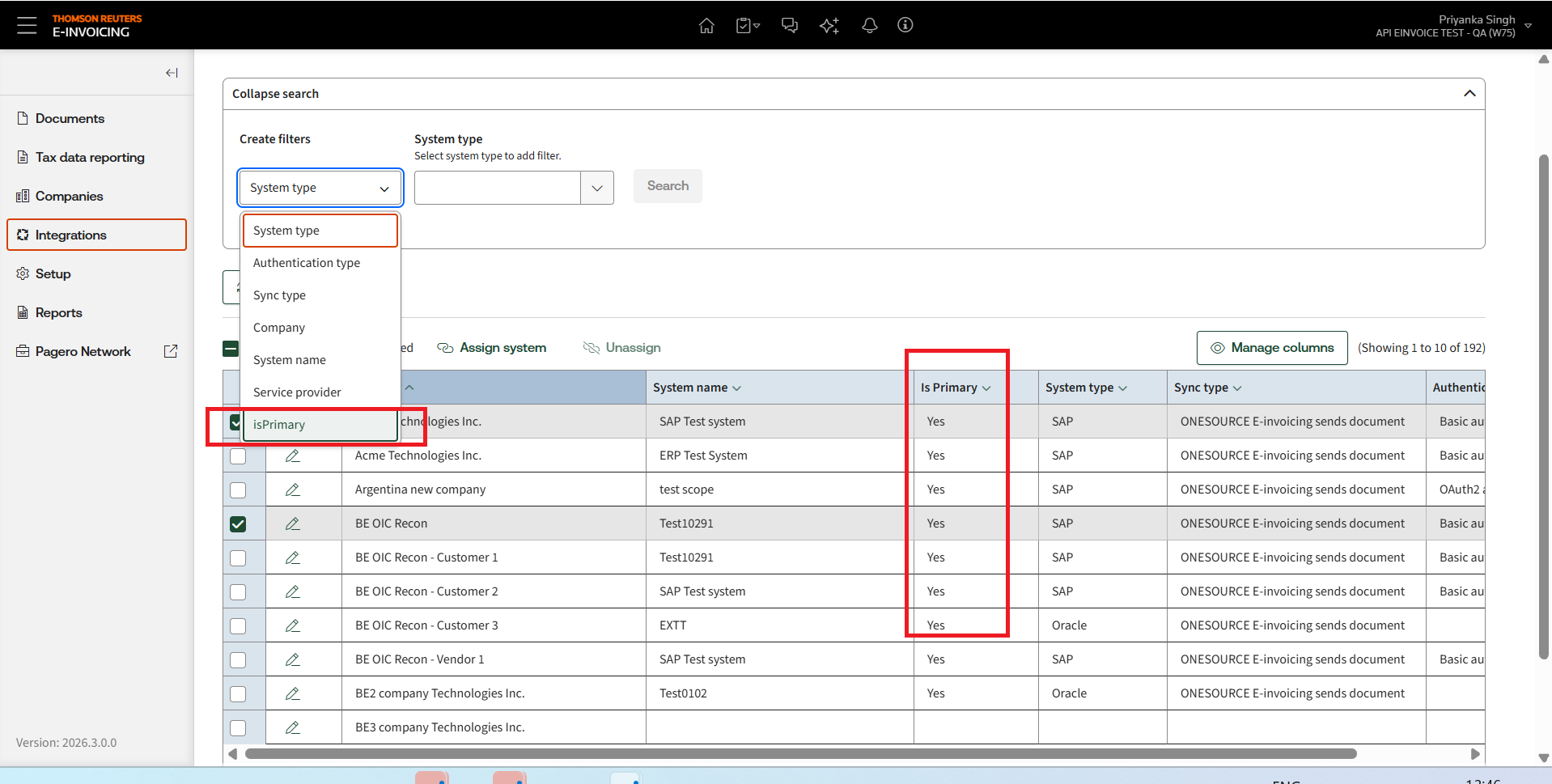
page has been enhanced to support multiple ERP destinations per legal entity.New capabilities include:
- Multiple ERP system assignments for a single legal entity.
- Primary ERP designation.
- Secondary ERP assignments.
- NewIs Primaryindicator.
- Enhanced filtering by Primary and Secondary assignments.
- NewActionsmenu for viewing and managing ERP assignments.
- Improved visibility of all systems associated with a legal entity.
Primary and Secondary ERP assignments
Each legal entity may have multiple ERP systems assigned.
Key behaviour:
- Only one ERP system can be designated as Primary.
- Additional systems are treated as Secondary systems.
- If a routing identifier successfully matches an ERP configuration, OEI routes the invoice to the matched ERP.
- If no routing identifier is present, OEI routes the invoice to the Primary ERP.
- If neither a valid routing identifier nor a Primary ERP assignment exists, the invoice remains within OEI for review and resolution.
Tenant-level controls
The new Multiple System Routing toggle provides tenant-level control over multi-ERP routing.
Important behaviour:
- Administrators can enable or disable Multiple System Routing before any multi-system assignments are created.
- Once Multiple System Routing has been enabled and multiple ERP assignments are configured for one or more legal entities, the setting cannot be disabled.
- An error message is returned if an administrator attempts to disable the feature while active routing configurations exist.
- This safeguard prevents disruption to active routing configurations and invoice processing.
Current release limitations
ERP Unassignment
The ability to unassign ERP systems is not included in this release. Customers should note:
- ERP unassignment – Once an ERP system is assigned to a legal entity, it cannot currently be removed. Primary ERP designations can be changed, and additional ERP systems can be added, but existing assignments cannot be deleted. Customers should plan ERP assignments carefully before activation.
- Bulk unassignment of non-primary ERP systems, including the associated confirmation workflow, is part of the planned future-state design and is not available in this release.
- Primary systems can be modified.
- Additional ERP systems can be assigned.
- Full unassignment capabilities are planned for a future release.
note
The ability to select multiple legal entities and unassign non-primary ERP systems via the
Unassign
button, including confirmation modal support, is part of the planned future-state design and is not available in the current R3.1.0 delivery. The current release explicitly disables the Unassign capability.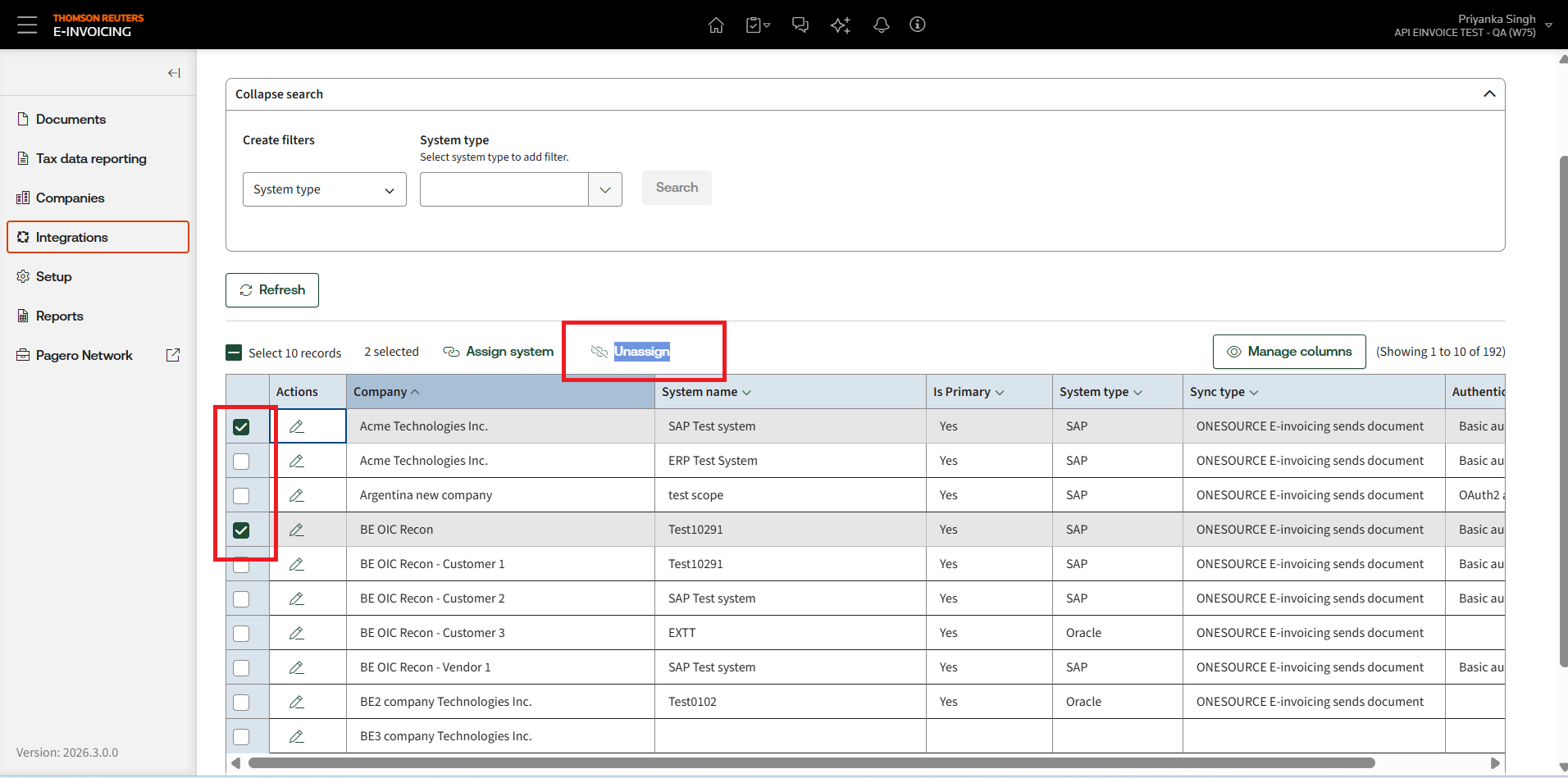
Feature scope summary
Capability | Status |
|---|---|
AP invoice routing | Supported |
Multiple ERP assignments per legal entity | Supported |
Routing Identifier-based invoice routing | Supported |
Primary ERP fallback routing | Supported |
Multi-system assignment management | Supported |
Primary/Secondary ERP visibility and filtering | Supported |
ERP unassignment | Not supported |
Routing failure recovery controls | Not supported |
Advanced routing error management | Not supported |
AR transaction routing | Not supported |
AR response routing | Not supported |
Recommendations before enabling Multiple System Routing
- Validate routing logic in a UAT or other non-production environment before go-live.
- Design your routing identifier strategy carefully in advance.
- Ensure system names configured in Pagero match the corresponding ERP System Names in OEI exactly, including case sensitivity.
- Account for current unassignment limitations when planning your rollout.
- Enable this feature only for legal entities that genuinely require multi-ERP routing.
Future enhancements
Planned future enhancements include:
- ERP system unassignment support.
- Bulk unassignment of non-primary ERP systems.
- Routing failure management.
- Enhanced routing validation controls.
- Improved routing error handling.
(R3.0.0) France E-Reporting aggregation support
Overview
ONESOURCE E-Invoicing now supports France e-reporting aggregation workflows, enabling visibility into how tax reporting data is grouped and submitted via the network provider.
This means customers can continue sending transactions to OEI one by one, while OEI and Pagero together support the process of validating, batching, and tracking those transactions for France reporting. OEI now provides visibility into which transactions are included in an aggregated report, what the batch status is, and what output has been prepared for submission.
Why this matters
For France e-reporting, transactions are not submitted individually in the same way as some other country flows. Instead, tax reporting data for applicable transactions is grouped into an aggregated report for a reporting period. This makes it important for customers to understand:
- whether each transaction is valid for aggregation,
- whether it is ready to be included in a batch,
- which aggregation batch it belongs to,
- and what the final aggregated output looks like.
How the process works
Step 1: Individual transactions are sent from OEI
Customers continue to submit individual transactions into OEI in their normal process. OEI sends those tax data reporting documents onward for France processing.
Step 2: Transactions are validated
Each transaction is validated before it can be included in an aggregation batch. If the transaction has an issue, it is not included in the batch until the issue is resolved. If the transaction is valid, it is marked as ready for batching. OEI now exposes this readiness through the new
readyToBatch
field.Step 3: Valid transactions are grouped into a batch
Transactions that are ready are grouped into an aggregation batch according to the reporting schedule defined. Each batch gets its own identifier so that it can be tracked.
Step 4: Customers can track the batch in OEI
OEI now provides both UI and API visibility into these batches. Customers can see the aggregation batch, the associated transactions inside that batch, the current batch status, and a preview of the resulting aggregated file.
End-to-End processing flow:
Step | Action | Detail |
|---|---|---|
1 | Document Submission | Customer submits individual B2B/B2C/Payment Received transactions through OEI |
2 | Validation by ONESOURCE Pagero | Each transaction is validated independently |
3 | Status Assignment | Transactions are marked either Error (excluded) or Ready-to-Batch (eligible) |
4 | Aggregation | Valid transactions are grouped into an aggregation batch based on reporting frequency configured in ONESOURCE Pagero |
5 | Batch Identification | Each batch is assigned a unique Aggregation ID for tracking |
6 | Visibility in OEI | Customers can track inclusion, view status, and access batch and document-level details via UI and API |
Key capabilities
UI enhancements:
- NewAggregated Reportstab introduced within theTax Data Reportingmodule.
- Grid view displaying aggregated batch details including: Aggregated ID, Report Name, Company Name, Status, Status Message, Batch Creation Date.
- View Outputdrill-down action to inspect individual TDR documents within a batch, showing TDR ID, Processing Status, and Tax Data Reporting Status.
- Previewtab to review the target aggregated file before submission.
What customers can do from the UI
Customers can drill into an aggregation batch and:
- see which individual Tax Data Reporting (TDR) documents were included,
- review the status of each TDR document in the batch,
- and preview the generated target output file.
This makes France reporting easier to understand and support because customers no longer need to rely only on backend investigation to understand what was grouped together and what was submitted. It improves transparency and reduces the effort required to trace a transaction from source document to aggregated report.
API enhancements:
API Change | Description |
|---|---|
GET /documents – aggregatedTaxDataReportId param | Filter documents by aggregated report identifier. The GET /documents API now supports a new query parameter called aggregatedTaxDataReportId. This allows customers to pull back only the documents that are associated with a specific aggregated report. |
GET /documents & GET /documents/{id} – readyToBatch field | The readyToBatch field has been added to the TaxDataReportInfo response structure. This shows whether a document is currently eligible to be included in an aggregation batch. Possible values are true or false. |
GET /documents & GET /documents/{id} – aggregatedTaxDataReportInfo object | The aggregatedTaxDataReportInfo object has been added to the DocumentInfo response. This returns aggregated report metadata: id, reportName, status, statusText. |
GET /aggregated-tax-data-reports/{id}/target-document | A new API has been added: GET /aggregated-tax-data-reports/{id}/target-document. This allows retrieval of the aggregate request payload / target document for a specific aggregated report. |
note
- For R3.0.0, France e-reporting support is limited to the happy path / approval scenario only.
- Cancellation, rejection, and rectification scenarios are not included in this release and are planned for future releases.
- In addition, POF integration from the OEI side will be covered in a future release.
Why this matters to customers:
Customers should plan testing and readiness activities based on the currently supported scope only, and should not expect cancellation, rejection, or rectification processing to be available in R3.0.0.
(R3.0.0) Workday added as a supported system type across ONESOURCE E-Invoicing
- Workdayis now available and displayed as a system type across the application, both at the UI and back-end levels.
- On theDocumentspage, documents associated with the Workday system type now correctly displayWorkdayin the system type field.Workdayis also available as a selectable value in theSystem Typefilter dropdown.
- On theIntegrationspage,Workdayis now available as a selectable system type when viewing or configuring an integration.Workdayis also included in theSystem Typefilter dropdown on this page.
- When adding a new integration withWorkdayas the selected system type, theAdd Integrationpage displays with theSync Typeautomatically pre-selected asReceiving System Fetches Document.
(R3.0.0) Optional API Key configuration added for source system endpoint authentication
- OEI users can now optionally configure anAPI Key NameandAPI Key Valuewhen setting up a source/sending system endpoint, across all supported authentication types (OAuth, Basic, Other, Oracle, etc.).
- Both fields are free-text inputs with no format validation or character length restrictions, accommodating varied API Key naming conventions such asAPI-Key,X-API-Key, orAuthorization.
- The two fields are independent and optional by default — if neither is populated, the configuration saves successfully and no API Key header is included in outbound requests.
- Conditional validation is enforced: if either theAPI Key NameorAPI Key Valueis filled in, the other field becomes mandatory before the configuration can be saved.
- When an endpoint is configured with anAPI Key NameandValue, OEI will automatically include the API Key in the HTTP request header of all outbound AP invoice requests sent to the trading partner's endpoint.
- TheAPI Key NameandAPI Key Valuefields are not available when configuring a receiving system endpoint, as this feature applies to source/sending configurations only.
- Some customer integrations and partner systems use API keys rather than other authentication models. By supporting API key authentication directly in setup, OEI becomes easier to configure for these external systems. This can simplify onboarding, reduce configuration complexity, and make OEI more flexible for customers working with modern APIs and external partner platforms.
(R3.0.0) Oracle AR status push update
OEI has resolved inconsistencies in how e-invoicing status updates are pushed back to Oracle Accounts Receivable (AR), ensuring accurate, timely, and complete status synchronization.
Who is it for?
Customers using Oracle ERP with OEI for e-invoicing.
What was fixed?
Issue | Resolution |
|---|---|
Inconsistent or delayed status updates in Oracle | Correct sequencing of status update events implemented |
Incorrect timestamps on status records | Accurate timestamp propagation ensured |
Incomplete status history in Oracle | Full status history synchronization now guaranteed |
Key benefits
- Improved financial visibility with real-time, accurate status updates in Oracle AR.
- Reduced need for manual reconciliation between OEI and Oracle.
- Better audit readiness with complete and correctly timestamped status histories.
- Lower support overhead due to fewer status discrepancy incidents.
(R3.0.0) API enhancements
System name enrichment in GET /documents
- TheGET /documentsAPI has been enhanced to include system name information.
- Customers who process documents from multiple source systems can now more easily identify where a document originated.
- This improves filtering, searchability, and visibility across mixed-source environments, especially for customers integrating multiple ERP or upstream platforms into OEI.
GET /documents API enhancement for clearance status enrichment
- TheGET /documentsAPI has also been enhanced to include additional clearance-related fields within theclearanceStatusresponse. These include:
- InvoiceHash
- QRString
- acquisitionDate
- Previously, customers may have needed multiple lookups or additional calls to gather all clearance-related information. This update makes more of that data available within a single response.
- This helps customers:
- reduce the number of API calls,
- improve integration performance,
- retrieve richer status information more quickly,
- and simplify downstream processing and reporting.