
R1.7.0.0 June 12, 2025 release notes
ONESOURCE E-Invoicing - API enhancements
Enhanced status updates for Cert Mode testing
In response to customer requests for testing invoices using a "Cert mode" in UAT environments, ONESOURCE E-Invoicing is implementing a temporary solution in this 1.7.0.0 release. Currently, OEI APIs only support "Test" and "Production" values for the sendmode parameter.
The issue:
During testing, our external processing partner internally converts "Test mode" transactions (sent by customers) into "Cert mode" transactions upon receipt. Previously, ONESOURCE E-Invoicing was only equipped to pull status updates for the original "Test mode" transactions, leading to a lack of visibility for the actual "Cert mode" status from the partner's end.
The 1.7.0.0 Solution (Temporary):
With this release, ONESOURCE E-Invoicing now has the capability to pull and accurately reflect status updates for "Cert mode" transactions that have been internally converted by our external processing partner.
This means you will gain clearer visibility into the status of these transactions during your UAT testing.important
Customers will continue to send transactions with the sendmode parameter set to "Test" via the ONESOURCE E-Invoicing APIs. The internal conversion to "Cert mode" remains on the partner's side.
Looking Ahead (Permanent Solution in 1.8):
The permanent solution
will be delivered in our upcoming release
. This will include:
- Adding"Cert"as a third enum value for the sendmode parameter in ONESOURCE E-Invoicing APIs.
- A dedicatedcompany-level configuration optionwithin the ONESOURCE E-Invoicing UI to manage Cert mode settings.
New Fields and Parameters for Enhanced Data Exchange
This release introduces several new fields and parameters to the ONESOURCE E-Invoicing APIs, providing richer data insights and improving integration capabilities for a more comprehensive and granular understanding of your e-invoicing transactions.
Key API Additions and Updates:
- relationshipType:
- Description:This parameter specifies the type of relationship to the receiver, as provided by the sender.
- Available Values:B2B (Business-to-Business), B2C (Business-to-Consumer), B2G (Business-to-Government).
- Note: This field aligns with the renamed "Relationship Type" now visible in the UI for enhanced consistency.
- transactionType:
- Description:This parameter indicates whether a transaction is classified as Accounts Payable (AP) or Accounts Receivable (AR).
- Available Values:Accounts Payable, Accounts Receivable.noteThis field supports the new "Transaction Type" column now visible in the UI across various grids.
- taxDataReportType (for TDR only):
- Description:Specifies the type of tax data report being submitted or processed.
- Available Values:"Receipt Transaction", "Payment", "Invoice".
- reportingStatus object (for TDR only):
- Description:A new object providing detailed status information for tax data reporting.
- Includes:
- status: The current status of the report.
- clearanceId: The associated clearance identifier.
- message: Any relevant status message.
- createTime: The timestamp of the status update.
- sendingServiceProviderId:
- Description:Identifies the service provider sending the document.
- sendingServiceProviderName:
- Description:Provides the name of the service provider sending the document.
- receivingServiceProviderId:
- Description:Identifies the service provider receiving the document.
- receivingServiceProviderName:
- Description:Provides the name of the service provider receiving the document.
These additions empower API users with more granular data points, facilitating enhanced reconciliation, improved transaction tracking, and more robust integration with other systems.
ONESOURCE E-Invoicing application updates
Tax Data Reporting (TDR) UI and feature enhancements
Building on the initial release of Tax Data Reporting (TDR) in R1.6.0.0, the ONESOURCE E-Invoicing 1.7.0.0 release introduces significant User Interface (UI) support and refined functionalities specifically for Singapore's tax reporting requirements. TDR automates the submission of detailed tax data to relevant authorities, ensuring enhanced transparency and compliance.
Key Highlights in 1.7.0.0:
- Dedicated UI Access for TDR:You'll now find a specificTax Data Reporting (TDR) menuwithin the ONESOURCE E-Invoicing UI. This new section features aTDR Transaction Grid- Reportsto monitor all your TDR submissions and aTDR Error Gridfor quick identification and resolution of any issues. Users can easily view TDR status updates, details, resubmit errors, or view errors through these dedicated grids.

- Enhanced Reporting & Traceability:TheReporttab on the Tax Data Reporting menu lists all reported transcations. For automated TDR submissions (where ONESOURCE E-Invoicing supports both invoice distribution and TDR reporting), these reports include a directlinking URLon the Tax Data Report ID column. Clicking this URL will take you to the associated invoice or document details on the main Documents page, ensuring seamless traceability.
- Improved Status Visibility:For documents that have a linked TDR transaction, you can now see the TDR details directly within the mainDocuments grid. ATDR ID hyperlinkin the document page allows users to quickly access the linked TDR information.
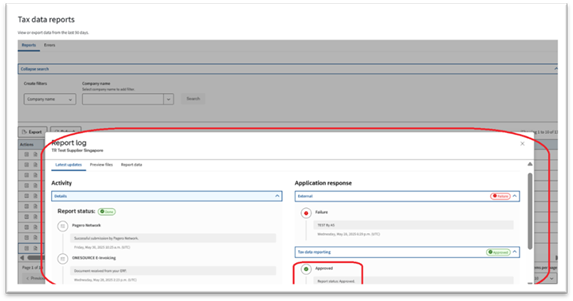
- Comprehensive Show Log Details:Access detailed log information for TDR reports through an enhancedShow Log drawer. This can be accessed from multiple points:
- Directly from the main Documents grid by clicking the TDR ID hyperlink.
- From the Tax Data Reporting > Reports tab by clicking the "Show log" icon.
- From the Tax Data Reporting > Errors tab by clicking the "Show log" icon for TDRs with an error status.
- The Show Log drawer provides:
- Latest Updates Tab:Displays activity logs (detailing data flow from ERP to OEI to Pagero, or Pagero to OEI to ERP) and TDR-specific application responses (Accepted/Rejected) with timestamps and descriptions.
- Preview Files Tab:Allows you to view target documents for the TDR, such as the TDR Notification Target, with direct open and download links.
- Document Data / Report Data Tab:Presents key details including Document number, Document Type (always TDR), Transaction ID, Report Type (Invoice, Payment, Receipt transaction), Direction (always Sent), Government ID, Transaction Type, TDR ID, TDR Reporty type, TDR Status (Approved/Rejected), and creation date.
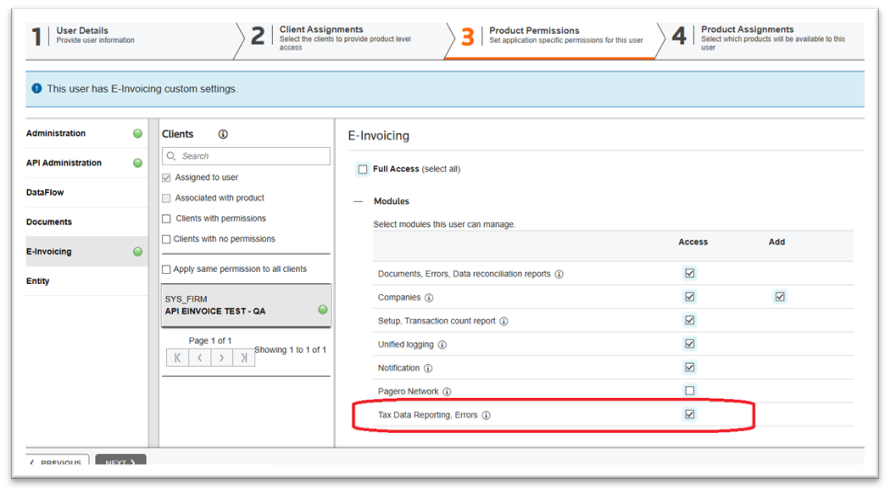
- Access Permissions:To access the new TDR UI and processes, users must have the specificTDR module enabledunder . Ensure your user role has this permission for full access.
These enhancements in 1.7.0.0 provide even greater automation, transparency, and control over your Singapore tax data reporting, empowering businesses to maintain compliance with increased efficiency.
Enhanced Support for "Order" Document Type: UI Availability
Building on the API support for the
"Order" document type
introduced in our previous release (R1.6.0.0), we are pleased to announce the full availability of its user interface (UI) support in this 1.7.0.0 release.
As promised, this enhancement significantly improves user interaction and accessibility for managing your electronic purchase orders. You can now:
- View "Order" Documents in the UI:Access and review documents classified as "Order" directly within the ONESOURCE E-Invoicing user interface.
- Efficient Tracking:Seamlessly track the status and details of your submitted orders, further streamlining the management of both Accounts Receivable (AR) and Accounts Payable (AP) aspects related to order documents.
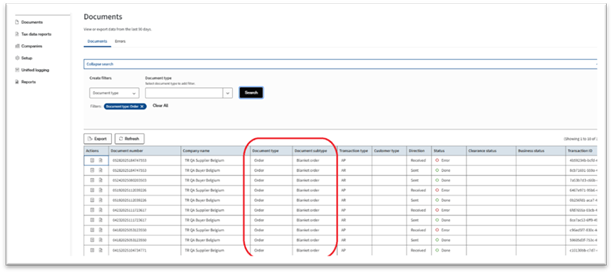
The inclusion of this UI functionality for the "Order" document type represents a significant step forward in centralizing and automating your document management capabilities, ensuring greater efficiency and compliance.
Streamlined Navigation: Consolidated Errors and New TDR Menu
This release introduces significant enhancements to the ONESOURCE E-Invoicing menu structure, designed to provide a more intuitive and homogeneous user experience, particularly in sync with the new Tax Data Reporting (TDR) pages.
Key Changes to Navigation:
- Consolidated Error Management:The standalone "Errors" menu item previously located in the left navigation panel has beenremoved. All error management is now seamlessly integrated within the"Documents" menu.
- Upon navigating to "Documents," you will now findtwo distinct tabs:
- Documents:This tab continues to display line-level details of all your transactions.
- Errors:Thisnew tabspecifically shows transactions that have encountered errors from the documents grid, centralizing your error monitoring alongside your main document view.
- Dedicated Tax Data Reporting (TDR) Menu:Anew top-level menu item named "TDR"has been added to the left navigation. This provides a clear and direct entry point for all Tax Data Reporting functionalities.
- Within the "TDR" menu, you will findtwo dedicated tabs:
- TDR Reports:View all your generated TDR reports.
- TDR Errors:Monitor and manage errors specific to your TDR submissions.
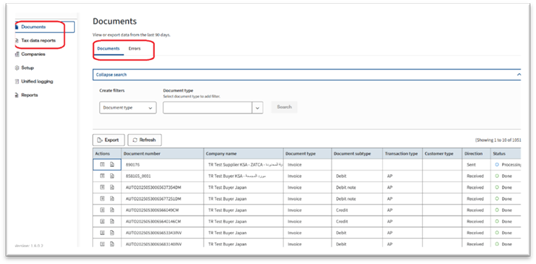
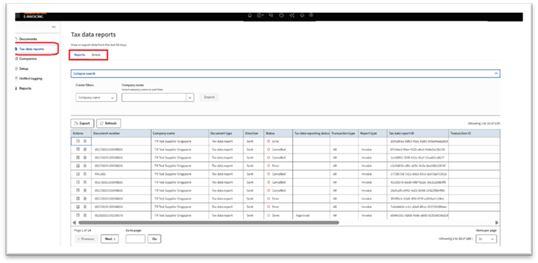
This reorganization ensures that error reporting is contextualized directly within your document workflows, and TDR gains its own dedicated, accessible space. The aim is to create a more consistent and efficient experience across the platform, allowing for easier navigation and quicker access to critical information.
Enhanced Data Reconciliation
ONESOURCE E-Invoicing has enhanced its Data Reconciliation feature, now fully compatible with the new ONESOURCE E-Invoicing APIs. This update provides customers with more comprehensive visibility and robust reporting capabilities for their e-invoicing transactions.
This release primarily focuses on significant UI changes to accommodate the rich response fields, offering a cleaner display and more granular data insights.
Key Enhancements:
- Real-time Data Access:The system now offers access toreal-time transaction data for up to 90 daysdirectly within the Data Reconciliation tab. This ensures immediate visibility into recent e-invoicing activities.
- Historical Data Reporting via Reports Queue:For data extending beyond the 90-day real-time window, users can utilize theReports Queueto generate and download reports. The Reports Queue allows users to specify a date range for their desired data period. The calendar in the start date field will allow selection up to 90 days from the current date for immediate report generation. Once generated, reports are readily downloadable.
- Enriched Data Grid in UI:The Data Reconciliation tab's report grid now features an expanded set of columns, providing more detailed insights into transactions.
- Streamlined Export Functionality:Users now have the option to export reports after selecting their desired date range. The exported report will include all grid items along with additional valuable line-item details such as:
- Line ID, Line Item Name, Line ID VAT Amount, Line ID Net Amount, Line ID Currency Code, VAT Code, VAT Type, VAT Rate, and VAT Value.
- Improved User Experience:For a cleaner and more accurate display, theerror flag has been removedfrom the user interface in the Data Reconciliation section.
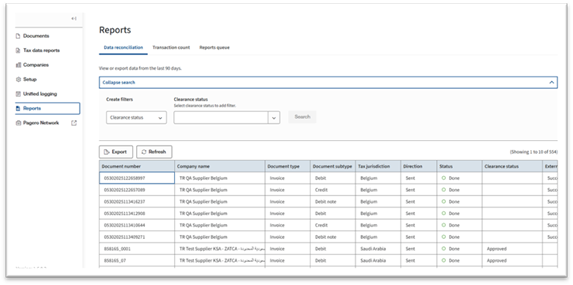
note
The support for application response-related statuses in data reconciliation is planned for a future release.
These enhancements empower users with greater control and insight into their e-invoicing data, facilitating more effective reconciliation and compliance reporting.
Addition of New Fields for Enhanced Data Visibility: Transaction Type and Relationship Type Fields (UI & API)
This release significantly improves transaction visibility and reporting by introducing the
Transaction Type
field and updating the Relationship Type
field across both the ONESOURCE E-Invoicing user interface and its underlying APIs. These additions and updates enhance data granularity, streamline management, and align terminology with industry standards.- Addition of Transaction Type (Accounts Receivable / Accounts Payable)
- A newTransaction Type columnhas been added to theDocument Grid, Errors Grid, and Reporting Grid, providing immediate visual classification of transactions. This crucial field is also exposed via the API, enabling comprehensive data utilization.
- Refined Relationship Type (B2B / B2C / B2G)
- The new field"Relationship Type", with its values updated to reflect standard industry classifications (B2B, B2C, B2G). This change is reflected consistently across both the UI and API.
- New Field Name & Values- "Relationship Type,"displaying values asB2B (Business-to-Business), B2C (Business-to-Consumer), and B2G (Business-to-Government).
- Platform-Wide Consistency:This updated field is available in theDocuments Grid, Errors Grid, TDR Reports, TDR Errors, and Data Reconciliation pages, appearing in both the respective grids and their filter options, ensuring a homogeneous experience.
Benefits:
These enhancements provide users with:
- Improved Visibility:Easily identify and understand transaction classifications (AR/AP) and relationship types (B2B/B2C/B2G).
- Enhanced Filtering:More precise control over data grids for quick information retrieval.
- Comprehensive Reporting:Include detailed transaction and relationship data in exported reports for better insights and analysis.
- Industry Alignment:Standardized terminology improves usability and aligns with global e-invoicing practices
Support for SAP Ariba integration
Enhanced SAP Ariba Integration: OAuth2 Authentication for AP Invoices
important
This OAuth2 authentication feature is only applicable when a middleware connection is used between ONESOURCE E-Invoicing (OEI) and SAP Ariba.
In this release, ONESOURCE E-Invoicing significantly enhances its integration capabilities with SAP Ariba by introducing support for OAuth2 authentication. This additional layer of security is specifically designed for Accounts Payable (AP) invoice posting via cXML, when utilizing a middleware solution.
This feature provides increased flexibility and robust security for your data exchange with SAP Ariba.
Key Highlights:
- Dual Authentication Support: OAuth2 authentication is available alongside the existing Shared Secret process to strengthen secure posting of cXML invoices from Pagero to Ariba ERP.
- Configurable in OEI: New authentication details can be configured in the ONESOURCE E-Invoicing UI under Setup > ERP Integration form.New Configuration Fields for OAuth2 include System Site, Token Name, Access Token URL, Scope (Optional), Grant Type, Client ID & Client Secret, Ariba Network ID, and PDF Opt-in/Out Option.
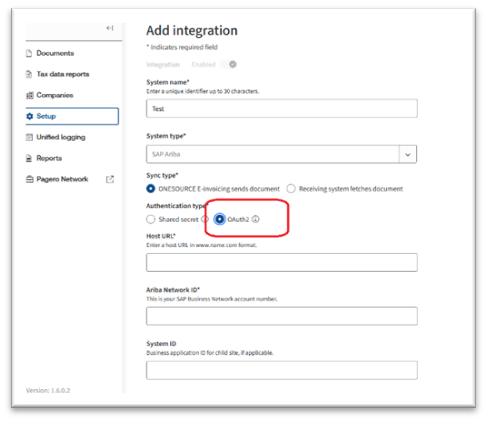
important
For Existing Integrations: Migration required for existing integrations using Shared Secret authentication to incorporate OAuth2 if leveraging a middleware.
SAP Ariba - Configurable PDF Attachment Option for SAP Ariba cXML Invoices
This release introduces enhanced control over your SAP Ariba cXML invoice postings. You now have the option to include or exclude PDF attachments with your cXML invoices, directly from the ONESOURCE E-Invoicing configuration.
Key Highlights:
- Flexible PDF Attachment: Choose whether to embed a PDF attachment within the cXML payload as a Base64 attachment.
- User-Controlled Option: A toggle in the Setup, then ERP Integration form allows opting in to post cXML invoices with PDFs or opting out to exclude them.
- Default Behavior: By default, no PDF will be embedded within the cXML payload for new integrations.
- Broad Applicability: This option is available for cXML invoice posting to Ariba, regardless of middleware or direct connection.
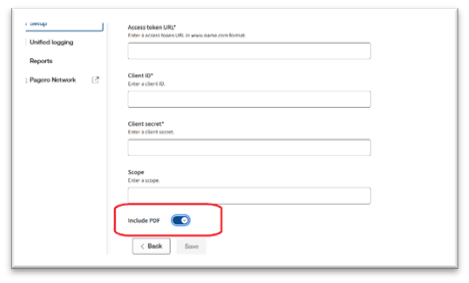
important
For existing SAP Ariba integrations, PDFs will not be embedded by default; visit the Setup, then ERP Integration form to select the new PDF attachment option.
GoSocket Integration
We enhanced our document submission capabilities for customers in Chile and Mexico, ensuring compliance with local tax requirements.
Key Features
- Company Onboarding Process: Now available through ONESOURCE, allowing for the input of company details, identification, and the upload of country-specific certificates.
- Document Submission: Seamlessly submit documents via a direct API call.
- Automatic AR Document Status Update: The status of Accounts Receivable documents submitted through API integration is automatically updated.
- Automatic AP Document Update: Accounts Payable documents are updated automatically to ensure consistency and accuracy.
- User Creation in GoSocket Portal: Automatically creates a user in the GoSocket portal to facilitate troubleshooting efforts.
How to Use It
- Company Onboarding: A new "Add Company" button has been introduced to streamline the onboarding of companies for integration with GoSocket. Simply provide the necessary information, and tooltips are available for all mandatory fields to guide you on the expected data format.
- Document Submission: Utilize our standard API to submit documents. Ensure that the document is provided in the correct payload format for successful submission.
- Automatic Document Updates: Managed by our OEI product, the latest updates can be accessed on our Documents page for real-time information.
ONESOURCE interface localization
The ONESOURCE E-Invoicing (OEI) application is now available in Romanian and Italian, in addition to Spanish, Polish, French, and German from earlier versions. Users can select their preferred language using the language selector on the
ONESOURCE My Account
settings page.Related Content
-
R1.7.0.0 Oracle release notes
Format: Article,
2 min read
Article,
2 min read
-
SAP S/4HANA release notes 2.0.0.0
Format:
Article,
2 min read