
Settings
Use the
Settings
page to configure the system. Examples of settings you can configure include whether you want to enable automatic rollforward, enable Accelerated Customer Content mode, or enable the ability to recalculate transaction amounts during edit.- To find a setting, use the selector beside theNamecolumn.

- Check the checkboxes next to the settings you want to show. By default, the options that you find by searching are checked. Clear the checkbox for options you do not want to set up. You can also enter a phrase in theSearchfield to locate a specific setting.

- SelectApply.
- On theSettingsscreen, use the selector beside theSettingscolumn to apply the setting.
- You can turn the setting on or off. Be sure to select the checkbox for the settings you want to apply.
- If there's an arrow in theSettingscolumn, there are additional parameters you'll need to specify. Use the arrow to open the menu of options and select the parameter.
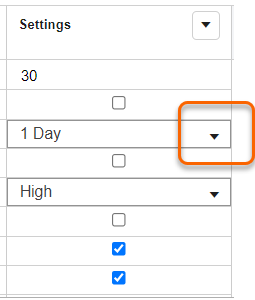
- A menu of settings options opens. You can enter a phrase in theSearchfield to locate a specific setting.
- Check the checkboxes next to the settings you want to show. By default, the options that you find by searching have checks. Clear the checkbox for options you don't want to set up.
- SelectSave.