
Advanced import
Advanced Import lets you import non-transactional data directly from Excel into OIC returns. Currently, this feature supports the Australian GST Analytical Tool (GAT) template and Australia GST Single template, with more options coming in future updates.
- Go to .
- Turn onEnable Advanced Import.noteThis step required special user permissions. Contact TR Support if you need help.
- Go to theNew Import Screenand selectAdvanced Importfrom theImport Typedropdown.A wizard with 2 steps will guide you through the process.
- Select a supported template from theTemplate Familydropdown.
- Select aSheet Import Typefrom the dropdown:
- Australia GAT supports:RevenueandExpensessheets
- Australia GST Single supports:OtherAdjustmentssheet
- Import your file (CSV or XLSX format).importantYour import file must include:
- A column with the entity code matching the OIC application's entity short name
- A column with the reporting date for the period
- Description values matching those in the workbook
- Sheet context and block context fields
For Australia GAT Revenue and Expenses, the sheet contexts and block contexts include:- Revenue:
- Sheet context: "Revenue"
- Block contexts: "Total revenue", "Grouping variance", "Profit and loss statement adjustments", "Balance sheet and capital adjustments", "Other adjustments"
- Expenses:
- Sheet context: "Expenses"
- Block contexts: "Total expenses", "Grouping variance", "Profit and loss statement adjustments", "Balance sheet and capital adjustments", "Other adjustments"
For Australia GST Other Adjustments, the sheet contexts and block contexts include:- OtherAdjustments:
- Sheet context: "OtherAdjustments"
- Block contexts: "PAYG Tax Withheld"
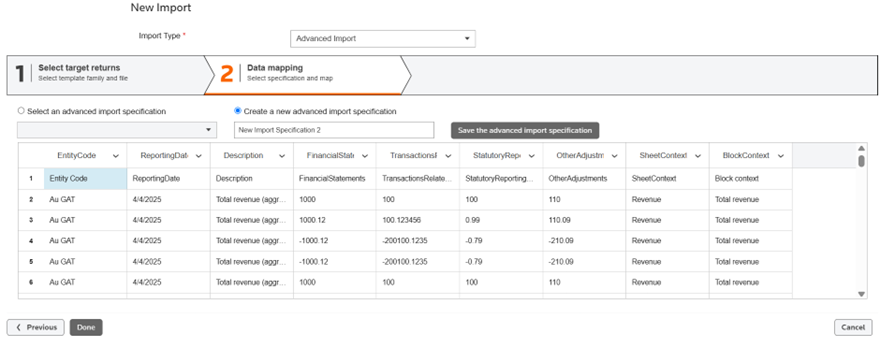
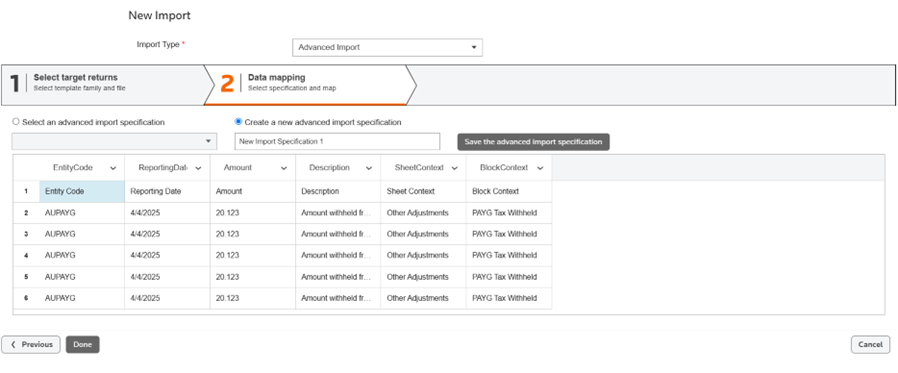
The following screenshot provides an example of an import file for Revenue/Expenses. The 1st 2 columns contain the entity code and the reporting date. The last 2 columns contain the sheet context and block contest. The following screenshot provides an example of an import file for Other Adjustments. The 1st 2 columns contain the entity code and the reporting date. The last 2 columns contain the sheet context and block contest.
- Use the dropdown list to map fields from your source file to return fields:
- Australia GAT Revenue and Expenses includes:Description,Financialstatements,TransactionsrelatedtootherGSTgroups,Statutory reporting adjustments (TBtoGAAP),Other adjustmentsThe following screenshot provides an example of the Data Mapping screen with the columns in the import file mapped to the fields of the Revenue sheet of AU GAT:
- Australia GST Other Adjustments includes:DescriptionandAmountThe following screenshot provides an example of the Data Mapping screen with the columns in the import file mapped to the fields of the Other Adjustments sheets of AU GST.
- Other fields include:EntityCode,ReportingDate,SheetContext, andBlockContext.
- Review the data preview.
- SelectSubmitto import the data to your workbook.
Contact support with any feedback or questions. Your insights will help us enhance this feature in future releases.
The following example is a screenshot of the
Data Mapping
screen with the import file columns mapped to fields on the Revenue sheet of AU GAT.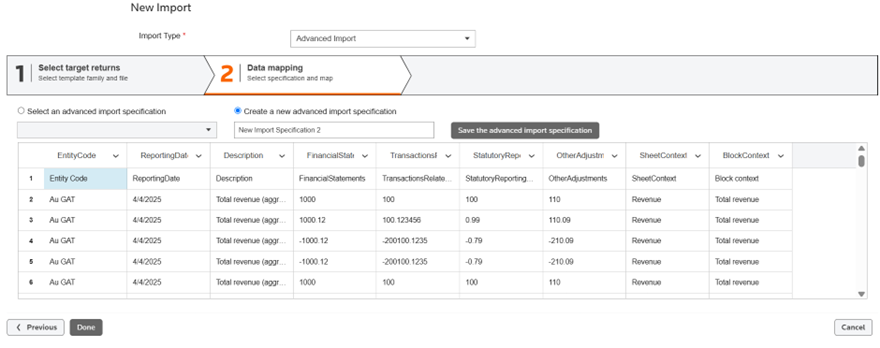
The following example is a screenshot of the
Data Mapping
screen with the import file columns mapped to fields on the Other Adjustments sheet of AU GST: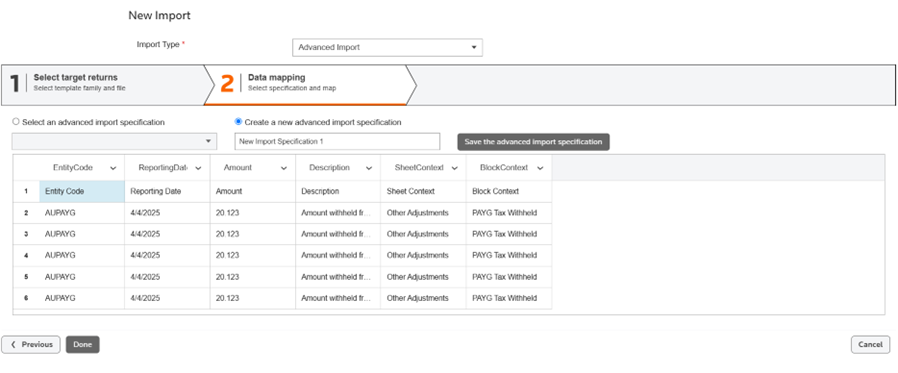
The following example is a screenshot of the Australia GAT workbook Revenue sheet with data imported by Advanced import.

The following example is a screenshot of the Australia GST workbook Other Adjustments sheet with data imported by Advanced import.
