
Install the integration
Import transport objects
Import the transports provided by Thomson Reuters into the client's Development system to set up ONESOURCE Indirect Tax Compliance Integration for SAP. All our objects reside in the Thomson Reuters Indirect Tax namespace ‘/TROIC/’. We do not change any customer-owned objects. The sequence of the transports remains the same for upgrades and new installations.
Transport | Description |
|---|---|
FS4K900472 | ONESOURCE Indirect Tax Compliance Integration-1.1.0.0-Code |
FS4K900473 | ONESOURCE Indirect Tax Compliance Integration-1.1.0.0-Config |
FS4K900376 | ONESOURCE Indirect Tax Compliance Integration-1.0.0.0-Roles |
Add the SAP user menu to a role
To enable users to access the new ONESOURCE Indirect Tax setup, configurations, and reports in SAP, follow these steps:
- Assign the role/TROIC/USERto your users. This role includes all TROIC transaction codes and the complete ONESOURCE User Menu, which is typically for users managing the system, configuration, and mapping.
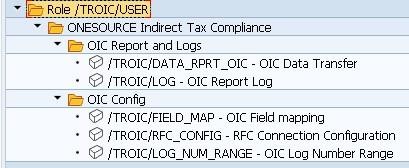
- Go toTransaction Code SU01to assign the role.
- Select theRolestab.
- Enter the role name/TROIC/USERand specify the start and end dates.

- Once the role is assigned, users can access the User Menu from the main SAP start screen.
- After assigning the role, users can access the User Menu. SelectUser Menu
 or press Ctrl+F10on the main SAP start screen.